
Select the Service Tool from the Main Menu and click the Integrated Update -> Integrated Update button to perform the integrated update.
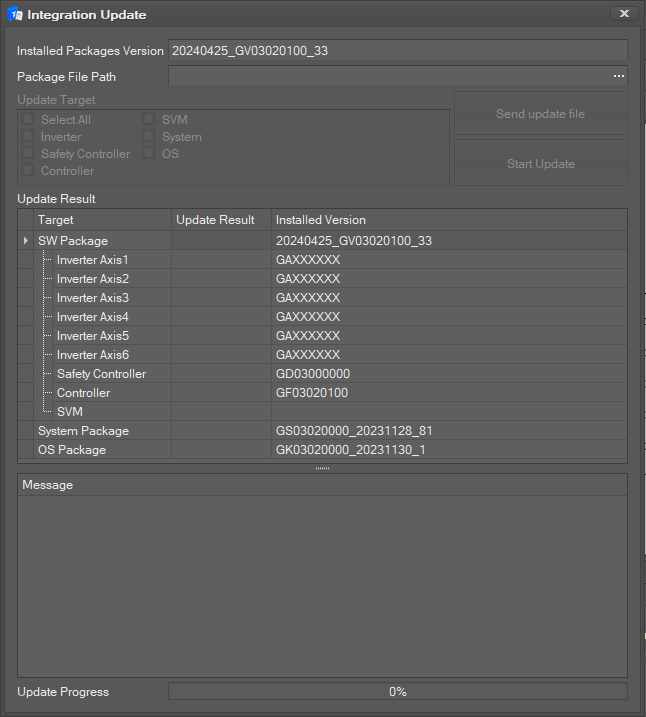
The following setting window will be displayed.
-
Take note of the information of the current package version.
-
Select the Package File Path to use for the update.
-
Click the Send Update FIle button to tranfer the update file. Once the transfer is successful, you can select the update target.
-
Select the Update Target. (Inverter/Safety Controller/Controller/SVM)
-
Click the Start Update button to run the update. Versions of each update target are displayed.
-
The Progress Status [%] and Log Message are displayed during the update.
-
The progress status of each update target is also displayed.
-
If the update fails, an update failure notification popup will be displayed.
-
If the update is successfully completed, an update success notification pop will be displayed.
-
Once the update is complete, a popup message asking for a system reboot will be displayed. Once the system reboots, the integrated update is completed.
Caution
This function is not supported by controller versions lower than GF02070000. In such a case, the setting window will be disabled, and the version of the currently connected controller will be displayed on the bottom of the setting window.
Caution
Updates are available when the robot is in the servo off state.