
This menu is used to set the homing offset value to the inverter of each axis.
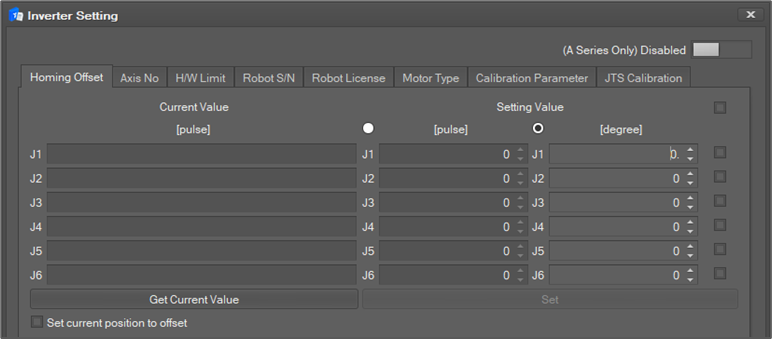
To set the Homing Offset,
-
Select the Homing Offset tab.
-
If the user clicks the Get Current Value button, the current setting values of all axes are shown in the Current Value area.
-
If the user wants to modify a setting value, the user can write a new setting value in Setting Value Click the checkbox of each axis and click the Set button to update the settings for a specific axis. All axes are selected when the topmost check box is selected.
-
The unit of setting value can be input as pulse counter or degree.
-
If you want to set the current position as offset, check Set Current position to offset.
-
Click the Set button to reflect the settings.
-
After the settings are updated, the system must be restarted.