
This is a command for moving a target distance after reaching the teaching pose or stopping movement if an external force is sensed during Force Control movement.
-
It requires force control in a specific direction, so it requires the [Compliance Control Setting] by default
-
The spiral search motion and periodic search motion for finding holes must be configured.
-
Spiral Search Motion options, Spiral Interval, Max. Radius, Velocity and Acceleration can be configured.
-
For the periodic search motion, amplitude, period and repeat can be configured.
-
The user can configure timeout as a method for notifying failures of the two motions.
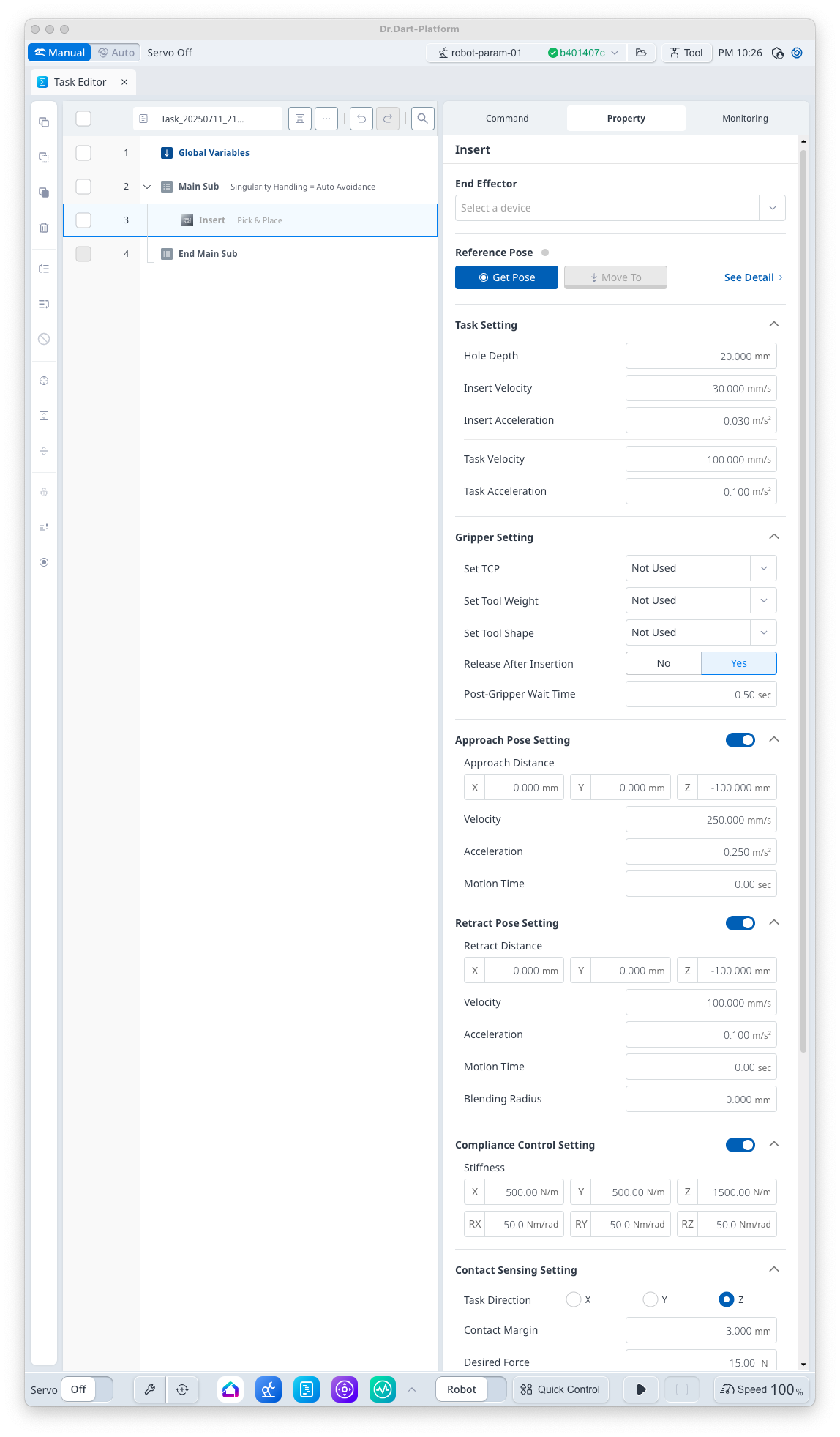
Basic Information
|
Item |
Description |
|---|---|
|
Recommended Device |
GripperDA, Gripper SA |
|
Optinal Features |
|
|
Command Completion Condition |
|
|
Support Robot Series |
AS, M, H, P |
Default Motion Sequence
Move to [Approach Pose] → Move to Hole Surface (Pose excluding [Hole Depth] + [Contact Margin] at Teaching Pose) → External Force Sensing → Hole Search Motion → Insert → [Release] action of [End Effector] → Move to [Retract Pose]
Definition of Screen
|
Item |
Description |
Default Value and Input Range |
|
|---|---|---|---|
|
Basic Setting |
End Effector |
I/O test available upon gripper selection |
|
|
Reference Pose |
Teaching Pose
|
|
|
|
Task Setting |
Hole Depth |
This is the depth of the hole. |
20 mm [0 ~ 200] |
|
Insert Velocity |
This is the velocity at the final insert. |
30 mm/s [0.001 ~ 8000] |
|
|
Insert Acceleration |
This is the acceleration at the final insert. |
0.03 m/s2 [0.001 ~ 20] |
|
|
Task Velocity |
This is the velocity from the approach pose to the hole surface. |
100 mm/s [0.001 ~ 8000] |
|
|
Task Acceleration |
This is the acceleration from the approach pose to the hole surface. |
0.1 m/s2 [0.001 ~ 20] |
|
|
Gripper Setting |
Set TCP (Option) |
Select TCP |
Not Used [TCP items set in robot parameter] |
|
Set Tool Weight (Option) |
Select Tool Weight
|
Not Used [Tool Weight items set in robot parameter] |
|
|
Set Tool Shape (Option) |
Select Tool Shape |
Not Used [Tool Shape items set in robot parameter] |
|
|
Release After Insertion (Option) |
Select Gripper [Release] Status after insert completion
|
True [True, False] |
|
|
Post-Gripper Wait Time |
Standby time after [Release] action. |
0.5 s [0 ~ 10000] |
|
|
Approach Pose Setting (Option) |
Use |
Select whether to use Approach Pose |
True [True, False] |
|
Approach Distance |
Distance from the teaching pose in x, y and z directions |
[0, 0, -100] mm [-99999.999 ~ 99999.999] |
|
|
Velocity |
This is the motion velocity to the approach pose. |
250 mm/s [0.001 ~ 8000] |
|
|
Acceleration |
This is the motion acceleration to the approach pose. |
0.25 m/s2 [0.001 ~ 20] |
|
|
Motion Time |
This is the motion time to the approach pose.
|
0 s [0 ~ 10000] |
|
|
Retract Pose Setting (Option) |
Use |
Select whether to use Retract Pose |
True [True, False] |
|
Retract Distance |
Distance from the teaching pose in x, y and z directions |
[0, 0, -100] mm [-99999.999 ~ 99999.999] |
|
|
Velocity |
This is the motion velocity to the retract pose. |
100 mm/s [0.001 ~ 8000] |
|
|
Acceleration |
This is the motion acceleration to the retract pose. |
0.1 m/s2 [0.001 ~ 20] |
|
|
Motion Time |
This is the motion time to the retract pose.
|
0 s [0 ~ 10000] |
|
|
Blending Radius |
This is the blending radius connecting the movement between the teaching pose and the retract pose. |
0 mm [0 ~ 1000] |
|
|
Compliance Control Setting (Option) |
Use |
Select whether to use the Compliance Control |
False [True, False] |
|
Stiffness |
Stiffness Setting |
x=y=z
rx=ry=rz
|
|
|
Contact Sensing Setting (Option) |
Use |
Select whether to use the Contact Sensing |
False [True, False] |
|
Task Direction |
Orientation setting during force control
|
Z [X, Y, Z] |
|
|
Contact Margin |
Margin for contact sensing section setting
|
2 mm [0 ~ 100] |
|
|
Desired Force |
Target Force Value
|
12 N [-1200 ~ 1200] |
|
|
Contact Force |
This is the reference force for contact sensing. |
10 N [0 ~ 1200] |
|
|
Timeout |
This is the contact sensing time. |
10 s [0 ~ 10000] |
|
|
Spiral Motion Setting (Option) |
Use |
Whether to use the Spiral Motion |
True [True, False] |
|
Spiral Interval |
Spiral Interval |
0.5 mm [0 ~ 100] |
|
|
Maximum Radius |
Max Radius |
10 mm [0 ~ 200] |
|
|
Velocity |
Spiral Search Motion Velocity |
12 mm/s [0.001 ~ 8000] |
|
|
Acceleration |
Spiral Search Motion Acceleration |
0.012 m/s2 [0.001 ~ 20] |
|
|
Periodic Motion Setting (Option) |
Use |
Whether to use the Periodic Motion |
True [True, False] |
|
Maximum Angle |
Max Distance
|
5 deg [0 ~ 360] |
|
|
Maximum Period |
Max Period |
2 s [0 ~ 10000] |
|
|
Maximum Repeat Number |
Max Repeat Count |
10 [0 ~ 10000] |
|
Note
The [Insert] command is influenced by the workpiece, hole and the deviation between the two, so it is difficult to select a setting that can succeed in all cases. The stiffness, force and margin values must be adjusted according to the environment, and the settings must be adjusted considering search motion information.
Version : E, A Series
The [Insert] command is not available on robot models without FTS.