
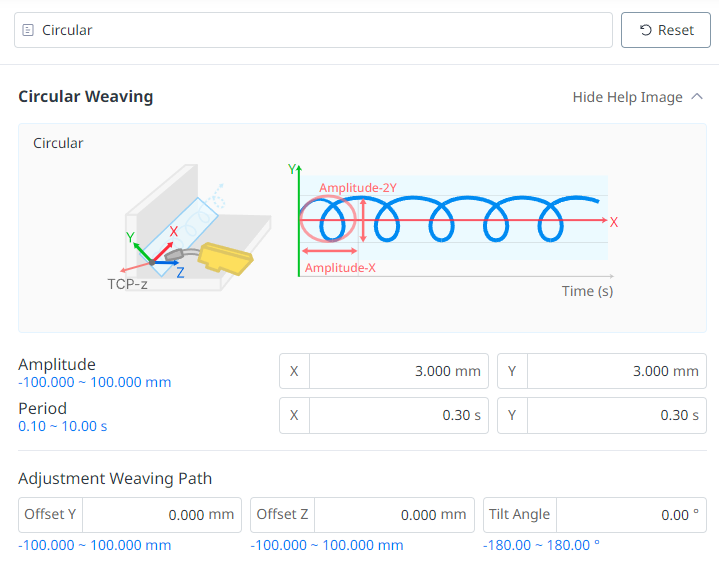
A circular weaving trajectory can be created by setting four values: the amplitudes and periods of both the weaving x and weaving y directions. The welding trajectory shown in the figure below is the result of overlapping the weaving motion and the taught linear trajectory. When a circular weaving pattern is applied, the weaving motion repeats according to the amplitude and period of the two directions. Therefore, the weaving period (x period, y period) per welding distance can vary depending on the target welding speed. For example, if the welding speed is 60 cm/min (=10 mm/sec) and the weaving period is 1 second (x period = y period = 1 s), 1 weaving period is made per 10 mm, but if the welding speed is 30 cm/min (5 mm/sec),2 weaving periods are made per 10 mm in the same weaving condition.
The values entered in the Weaving Condition Settings screen are as follows:
|
No |
Category |
Desc |
|---|---|---|
|
1 |
Amplitude |
Weaving width in two directions of a circular weaving pattern. Enter the desired weaving width in the desired direction based on the welding path (unit: mm). For example, to weave a circle (diameter = 6 mm) with a weaving width of 6 mm centered on the welding path, enter X = 6, Y = 6. |
|
2 |
Period |
Weaving cycle (in seconds) per two directions. For example, to weave a circle (diameter = 6 mm) with a weaving width of 6 mm and a cycle of 1 second centered on the welding path, enter CycleX=1 and CycleY=1. |