
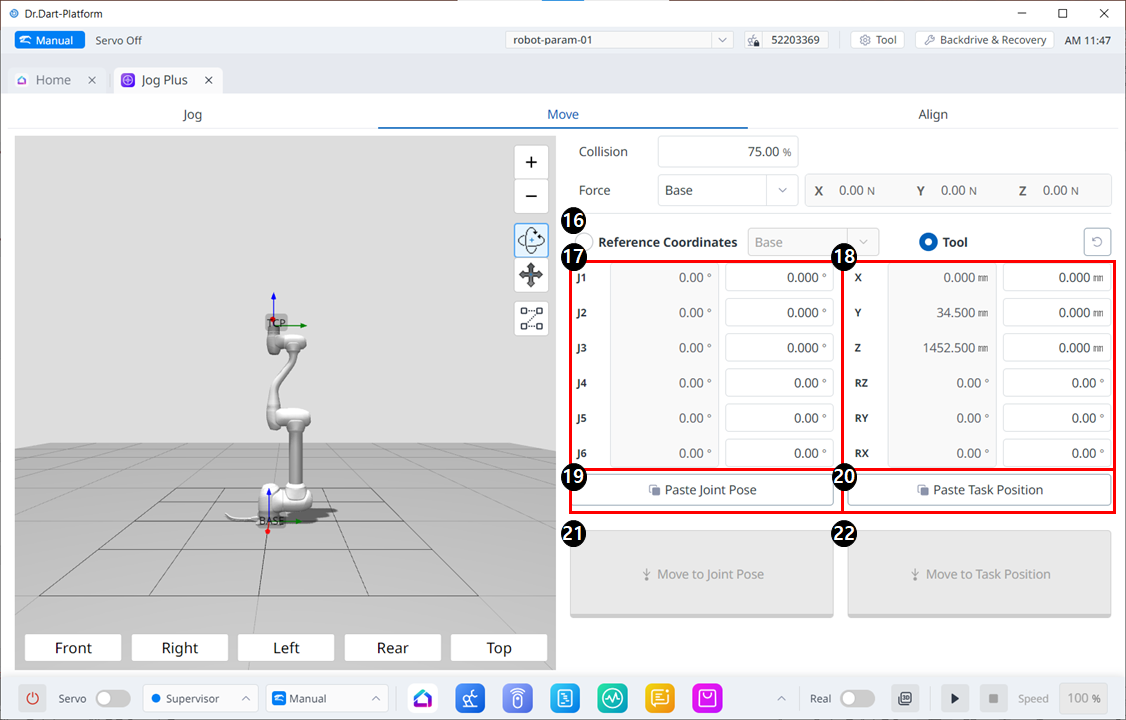
Move Menu Layout
|
|
Item |
Description |
|---|---|---|
|
16 |
Reference Coordinates |
Select the reference coordinate system to be used for the task coordinates in Figure 18. You can choose Base, World, or User coordinates. |
|
17 |
Joint Posture |
Displays the current robot posture and the target joint posture. |
|
18 |
Task Posture |
Displays the current robot posture and the target task posture that fit the selected reference coordinate system. |
|
19 |
Paste Joint Posture |
Paste the posture value copied to the clipboard into the joint posture panel. |
|
20 |
Paste Task Posture |
Paste the posture value copied to the clipboard into the task posture panel. |
|
21 |
Joint Move button |
This button causes the robot to move to the target joint posture. |
|
22 |
Task Move button |
This button causes the robot to move to the target task posture. |