
In Robot Limits, various limits related to the robot can be set. These limits are used to ensure the robot operates safely within the set limits.
Robot limits can be set in Robot Parameter > Safety Settings > Robot Limits.
-
For a detailed description of each limit, see Robot Limits.
Robot Limits are largely divided into 3 categories. Each category includes the following screens and functions.
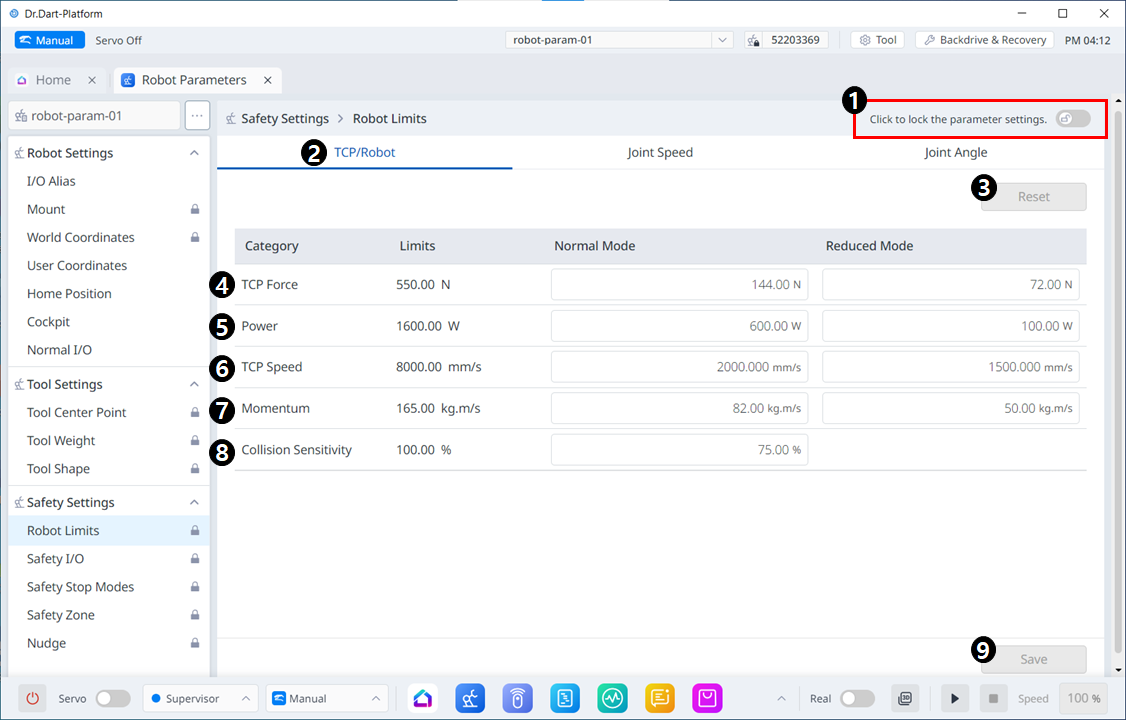
Menu Items
|
|
Item |
Description |
|---|---|---|
|
1 |
Lock Toggle Button |
Used to lock the set value. The safety password is required for modifying the set value. |
|
2 |
TCP/Robot |
Large classification of robot limits. |
|
3 |
Reset |
Used to reset settings. |
|
4 |
Force |
Used to set the force. |
|
5 |
Power |
Used to set the power. |
|
6 |
Speed |
Used to set the speed. |
|
7 |
Momentum |
Used to set the momentum. |
|
8 |
Collision |
Used to set the collision. |
|
9 |
Save |
Used to save the applicable setting. |
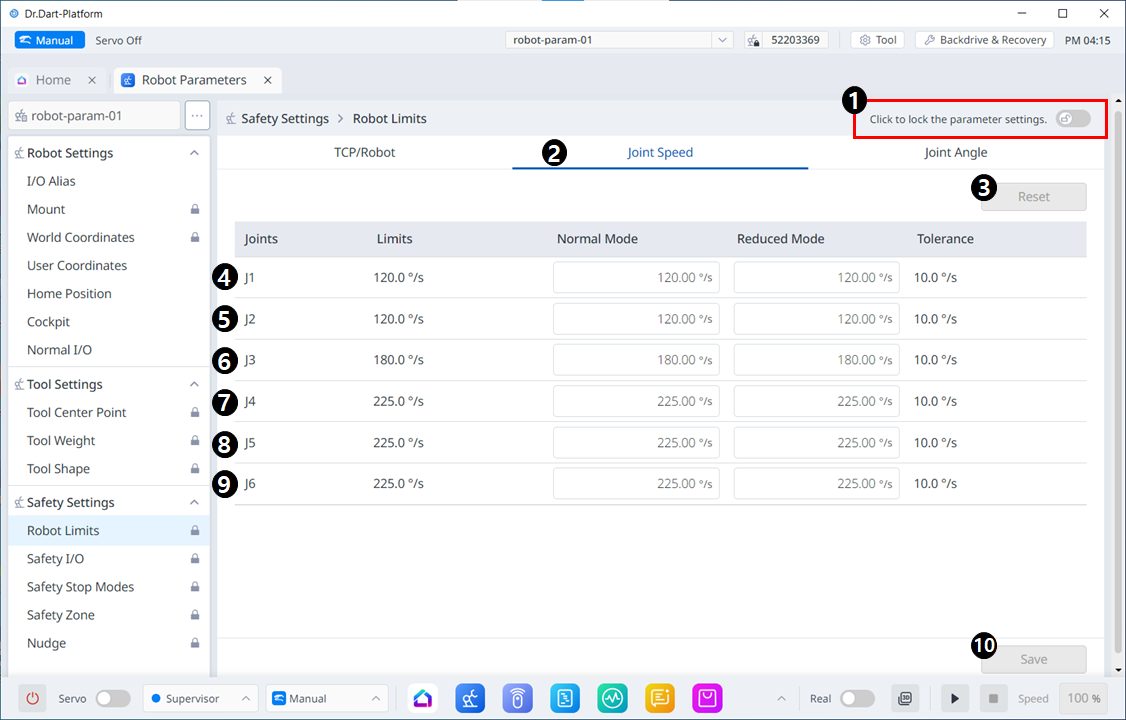
Menu Items
|
|
Item |
Description |
|---|---|---|
|
1 |
Lock Toggle Button |
Used to lock the set value. The safety password is required for modifying the set value. |
|
2 |
Joint Speed |
Large classification of robot limits. |
|
3 |
Reset |
Used to reset settings. |
|
4 |
J1 |
Used to set the settings for Normal and Reduced modes respectively. |
|
5 |
J2 |
Used to set the settings for Normal and Reduced modes respectively. |
|
6 |
J3 |
Used to set the settings for Normal and Reduced modes respectively. |
|
7 |
J4 |
Used to set the settings for Normal and Reduced modes respectively. |
|
8 |
J5 |
Used to set the settings for Normal and Reduced modes respectively. |
|
9 |
J6 |
Used to set the settings for Normal and Reduced modes respectively. |
|
10 |
Save |
Used to save the applicable setting. |
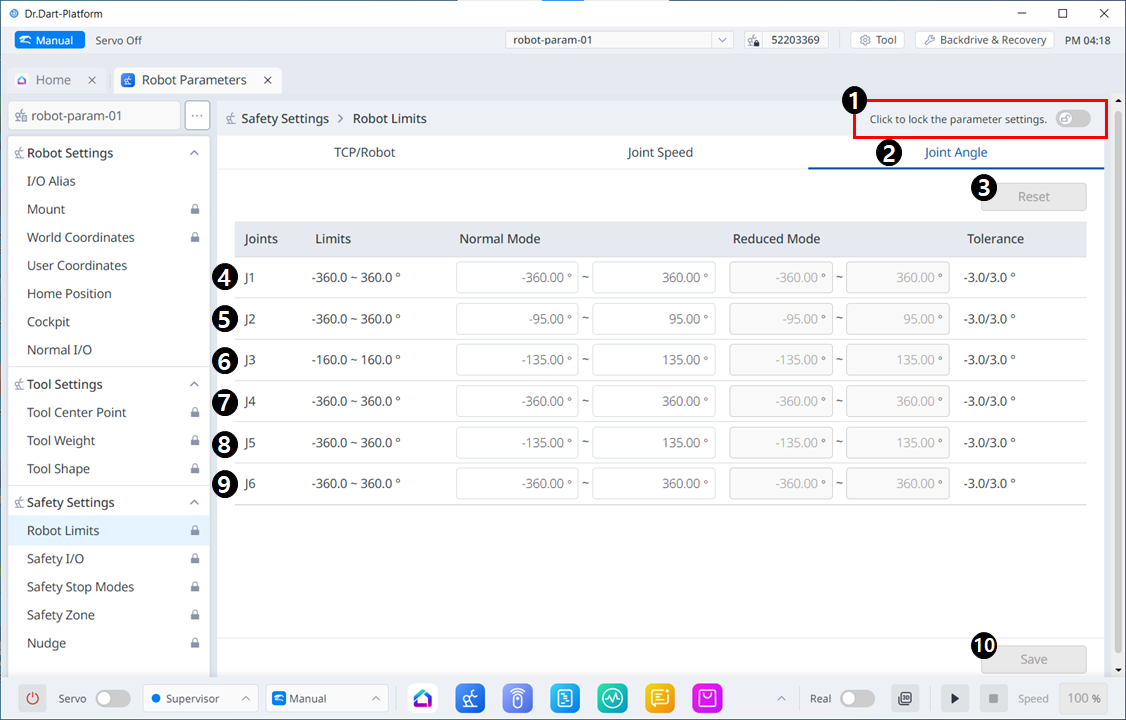
Menu Items
|
|
Item |
Description |
|---|---|---|
|
1 |
Lock Toggle Button |
Used to lock the set value. The safety password is required for modifying the set value. |
|
2 |
Joint Angle |
Large classification of robot limits. |
|
3 |
Reset |
Used to reset settings. |
|
4 |
J1 |
Used to set the settings for Normal and Reduced modes respectively. |
|
5 |
J2 |
Used to set the settings for Normal and Reduced modes respectively. |
|
6 |
J3 |
Used to set the settings for Normal and Reduced modes respectively. |
|
7 |
J4 |
Used to set the settings for Normal and Reduced modes respectively. |
|
8 |
J5 |
Used to set the settings for Normal and Reduced modes respectively. |
|
9 |
J6 |
Used to set the settings for Normal and Reduced modes respectively. |
|
10 |
Save |
Used to save the applicable setting. |