
Nudge Setting
If the robot stops in the collaborative zone due to safety stop mode SS2 or RS1,, reset is unavailable in Interrupted state but work can be resumed with nudge input
-
To set Nudge, select Robot > Nudge item from the Robot Workcell.
For more information, see Nudge.
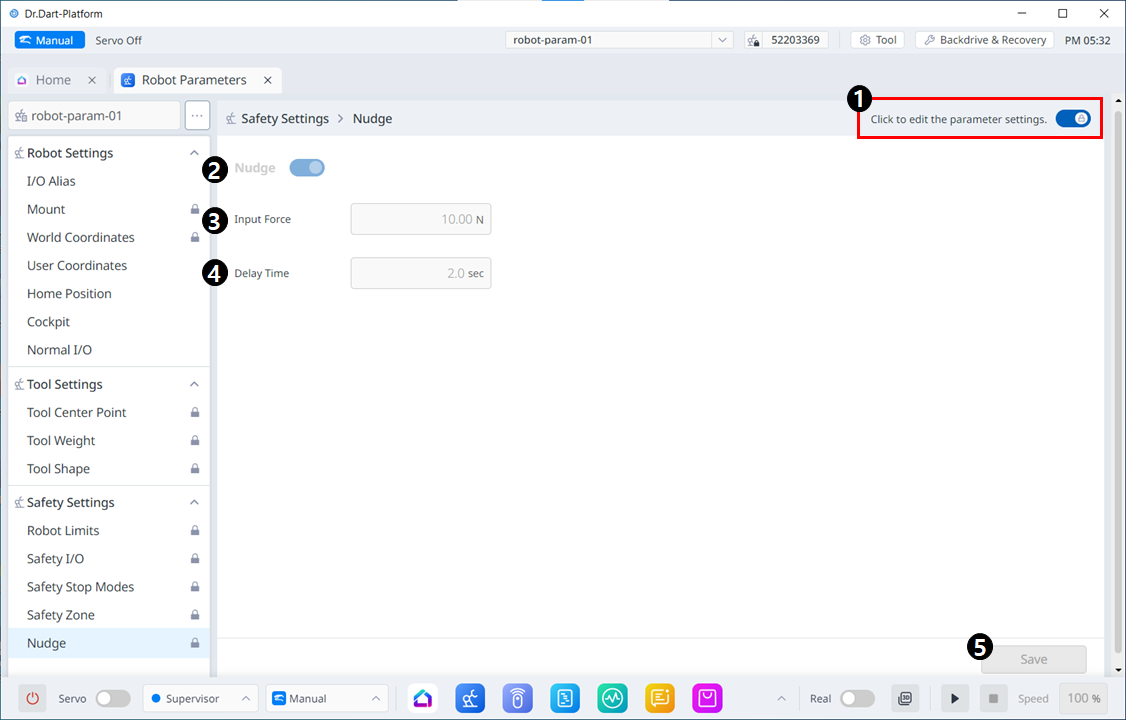
Menu Items
|
|
Item |
Description |
|---|---|---|
|
1 |
Lock Toggle Button |
Used to lock the set value. The safety password is required for modifying the set value. |
|
2 |
Whether to use Nudge |
This button allows you to choose whether to use Nudge. |
|
3 |
Force Input |
This field is where the desired Force value is entered. |
|
4 |
Delay Time |
This field is where the delay time is set. |
|
5 |
Save |
This button allows you to save the value you set. |