
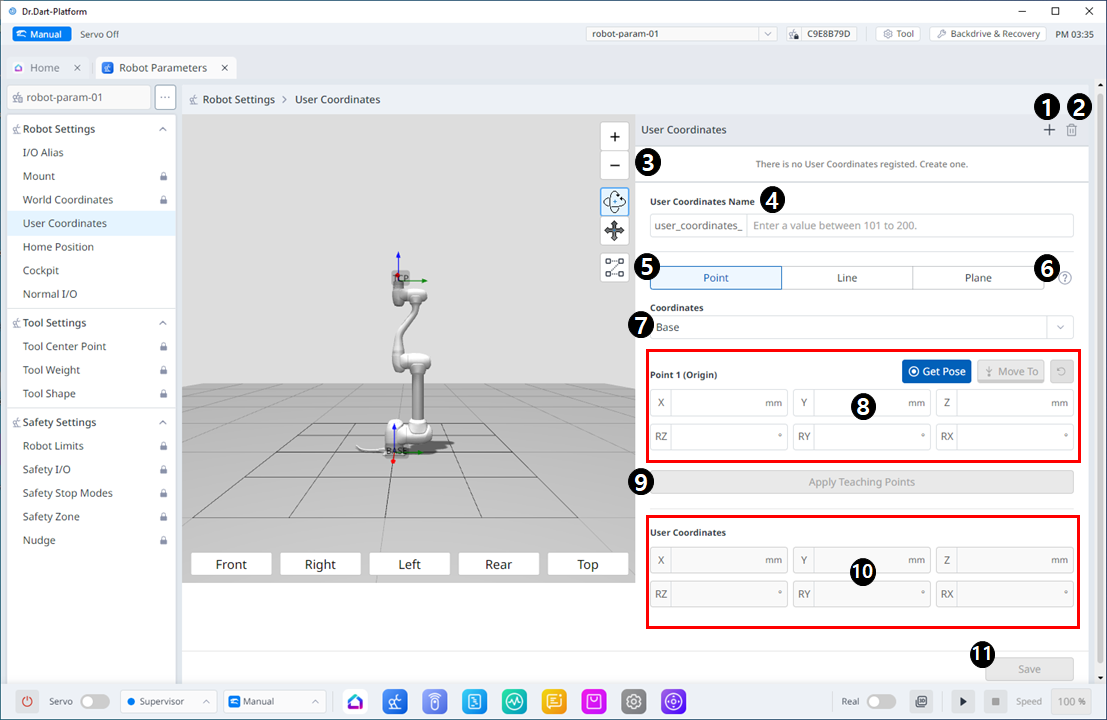
Menu Layout
|
|
Item |
Description |
|---|---|---|
|
1 |
Add New |
This button allows you to add User Coordinates. Up to 100 user coordinates can be added. |
|
2 |
Delete |
This button allows you to delete the selected User Coordinate. |
|
3 |
Selected User Coordinates |
This is a list of the User Coordinates added. |
|
4 |
User Coordinates Name |
This is where you can set the names of the User Coordinates. A number from 101 to 200, with a maximum length of 40 characters, can be entered. |
|
5 |
Point, Line and Plane settings |
This is where you can set each point, line, and plane. |
|
6 |
Information icon |
A guide to User Coordinates is provided. |
|
7 |
Coordinates |
This is where you can select either Base or World as the basis for the desired value. |
|
8 |
Point1 setting |
This is where you can enter values for each of the 6 axes of Point 1 and run Get Pose or Move To. |
|
9 |
Apply Teaching Points |
This button allows the desired values to be applied after they are entered. |
|
10 |
User Coordinates |
In the User Coordinates section, you can enter each of the desired values. |
|
11 |
Save |
This button allows the setting values to be saved. |