
Breadcrumbs

Flange I/O Setting


This menu can only be accessed when connecting to a robot installed new flange.
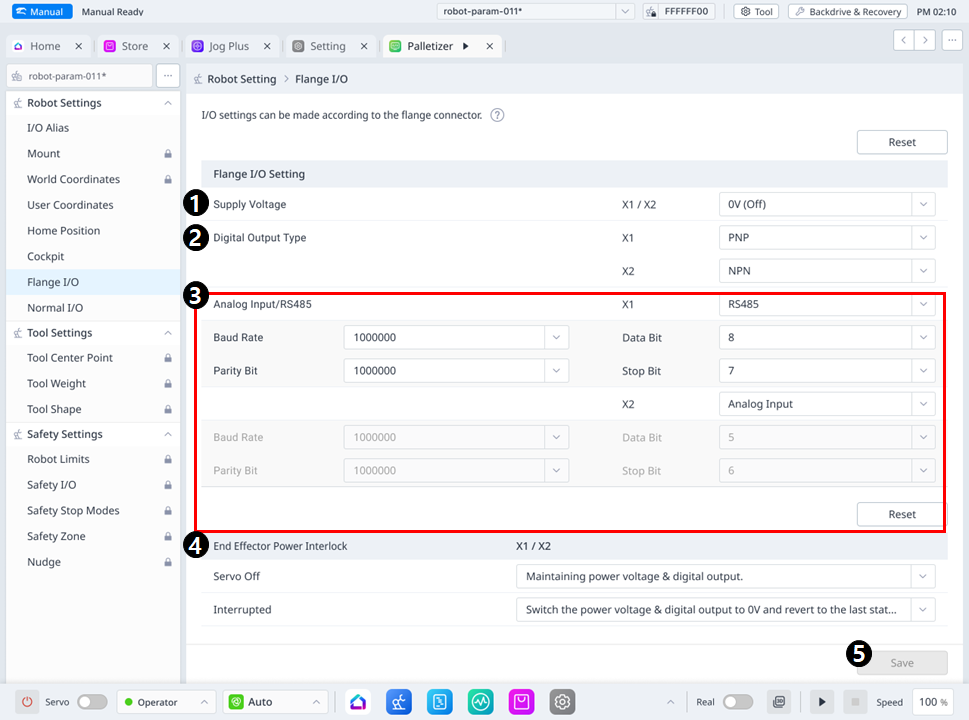
image2024-3-11_10-24-35.png

Menu Item


Item

Description

1

Supply Voltage

  • Provides the ability to set the supply voltage.

  • You can select the voltage(0V(=Off) or 12V or 24V)

2

Digital Output Type

Provides the function to set the digital output type for each X1 and X2 port.

  • In series A, only X1 port is supported in the digital output type item.

  • In series M/H , both X1 and X2 ports are supported in the digital output type item.

3

Analog Input/RS485 Mode Setting

Provides the ability to select Analog Input or RS485.

  • In series A, only the X1 port is supported in the Analog Input/RS485 item.

  • In series M/H , both X1 and X2 ports are supported in the Analog Input/RS485 item.

When selecting Analog Input,

  • Baud Rate, Data Bit, Parity Bit, Stop Bit items are disabled

When selecting RS485,

You can choose from the following options

  • Baud Rate : 19200, 38400, 57600, 115200(default), 1000000 bps

  • Data Bit : 5, 6, 7, 8(default), 9 Bit

  • Parity Bit : Odd, even, none(default)

  • Stop Bit : 1(default), 2

4

End Effector Power Interlock

Provides a function to set the operation when Servo Off or Interrupted.

  • In series A, the Servo Off selection combo box is disabled.

5

Save

It can apply the set values.