
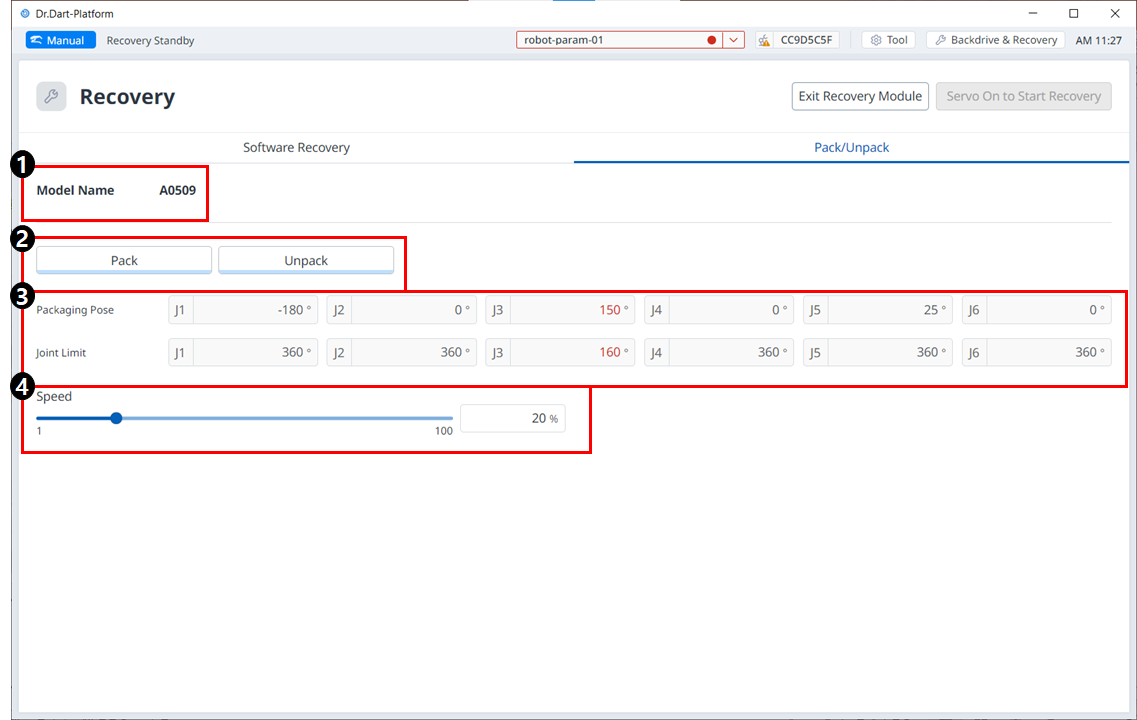
Menu Items
|
|
Item |
Description |
|---|---|---|
|
1 |
Model Name |
The name of the connected robot model appears. |
|
2 |
Pack/Unpack |
Either Pack or Unpack can be selected. |
|
3 |
Packaging Pose/Joint Limit |
The pose and joint limit values appear. |
|
4 |
Speed Ratio |
The speed of the pack or unpack mode can be adjusted via a slider or input. |
To configure the packaging mode, follow these steps:
-
Tap the Recovery menu in the header pane.

-
Select the Packaging Mode tab.

-
To enable packaging mode, tap the Servo On to Start Recovery button.

-
The robot automatically moves to the set packaging pose.
-
The Pack button allows you to put the robot in the Pack position and the Unpack button allows you to put the robot in the Default Home Position.
-