
3.7.0 3.6.0 3.5.0 3.4.0 3.3.0 3.2.2 3.2.1 3.2.0 1. M/H Series 2. A Series 3. E Series 4. P Series Korean English Chinese Czech Dutch French German Hungarian Italian Japanese Polish Portuguese Spanish

Setting language in system settings.

To set the UI language of the operation program, follow these steps:

  1. Tap the Settings Module button on the main menu, and under System Settings, select Language & Format.

  2. Select the language to set from the language list and tap the Save button.
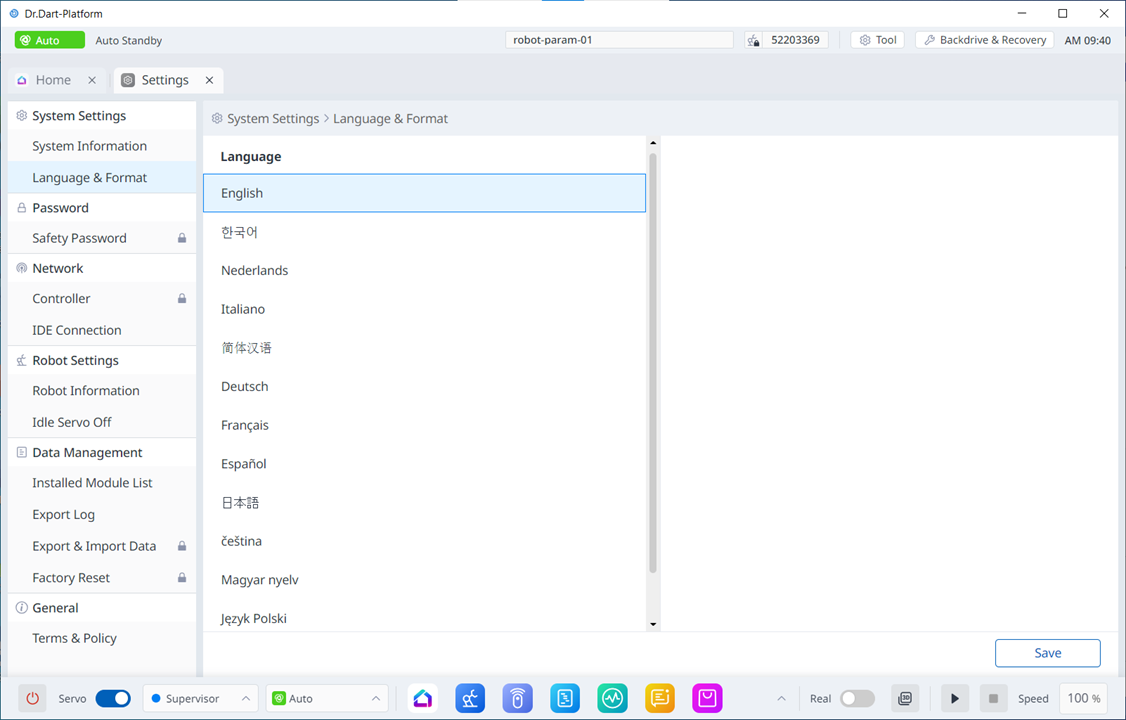
image2024-3-7_13-40-3.png