
Menu Items
|
|
Item |
Description |
|---|---|---|
|
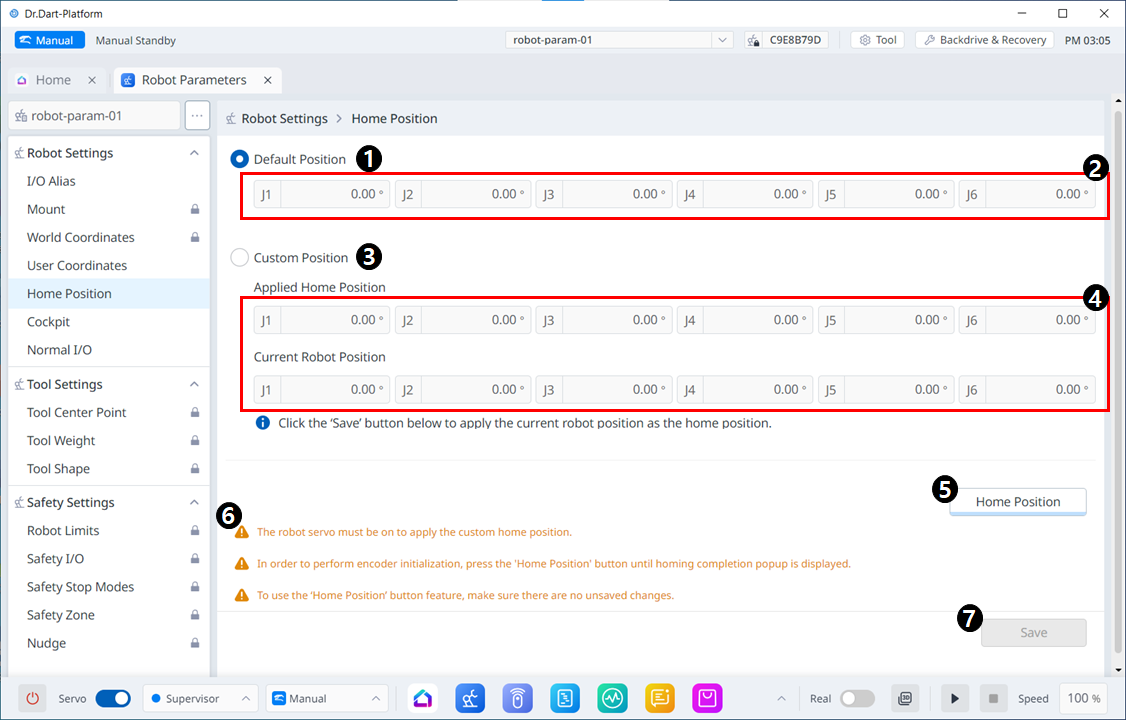
1 |
Default Position option |
This is the section where you can select the Default Position option. |
|
2 |
Default Position value |
These are the values that correspond to the Default Position, all of which are 0. |
|
3 |
Custom Position option |
This allows you to select the Custom Position option. |
|
4 |
Custom Position value input |
This is the section where you can enter values for the 6 axes, apply Get Pose, and initialize them. |
|
5 |
Home Position |
This button allows you to set the Default Position or the Custom Position you set as the Home Position. |
|
6 |
Warning Message |
A note of caution when setting this up. |
|
7 |
Save |
This button allows the setting values to be saved. |