
Mandatory EASY 3 min
The robot is in its packaging pose to allow easy transportation or packaging. To use the robot, it is necessary to disengage the packaging pose. As the robot maintains a pose that exceeds the Joint Angle Limit when in packaging pose, it is impossible to set Servo On status due to safety limit violation. The robot LED is illuminated red in this state.
If there is a case in which you need to package the robot due to relocating, set the package pose by using move with packaging pose in the packaging mode.
The process of releasing the packaging pose is as follows:
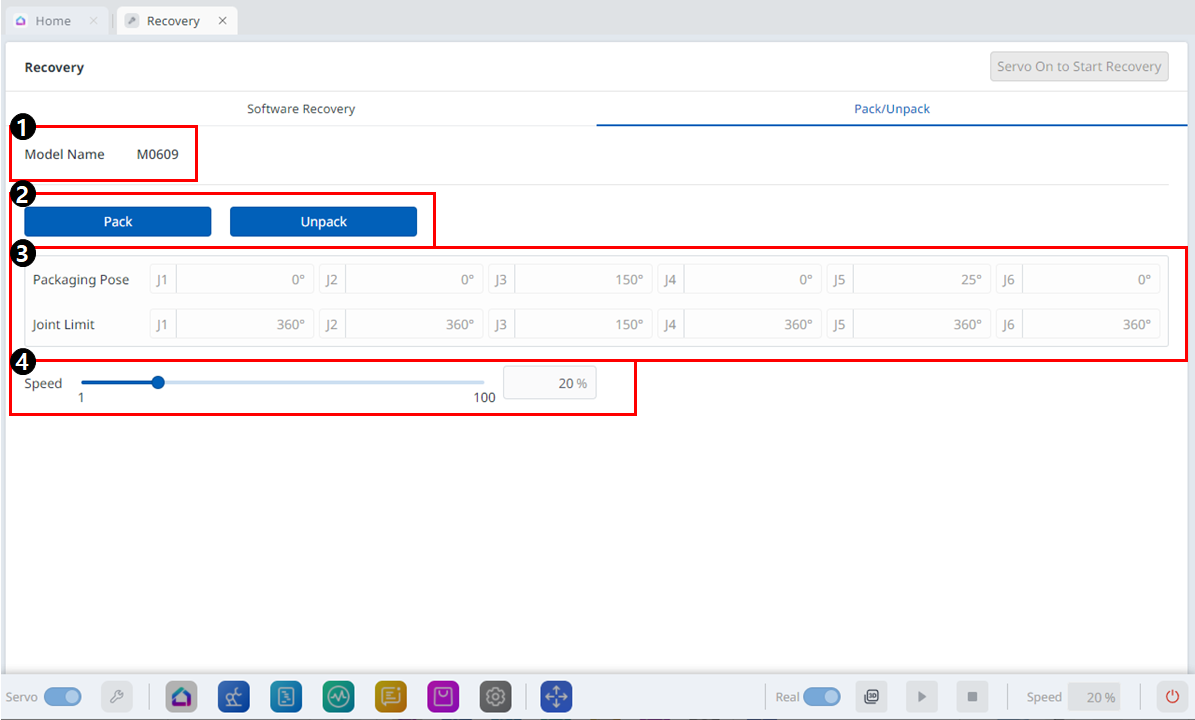
Menu Items
|
|
Item |
Description |
|---|---|---|
|
1 |
Model Name |
The name of the connected robot model appears. |
|
2 |
Pack/Unpack |
Either Pack or Unpack can be selected. |
|
3 |
Packaging Pose/Joint Limit |
The pose and joint limit values appear. |
|
4 |
Speed Ratio |
The speed of the pack or unpack mode can be adjusted via a slider or input. |
To configure the packaging mode, follow these steps:
-
Tap the Recovery menu in the header pane.

-
Select the Packaging Mode tab.

-
Tap the Servo On to Start Recovery button to enable packaging mode.

-
The robot automatically moves to the set packaging pose.
-
The Pack button allows you to put the robot in the Pack position and the Unpack button allows you to put the robot in the Default Home Position.
-