
This is a command for cleaning the target or equipment with an airblowing tool.
-
It must be used together with the End_Task skill, and a task/joint motion command can be inserted.
-
However, if a pattern is used, a task/joint motion command is not inserted.
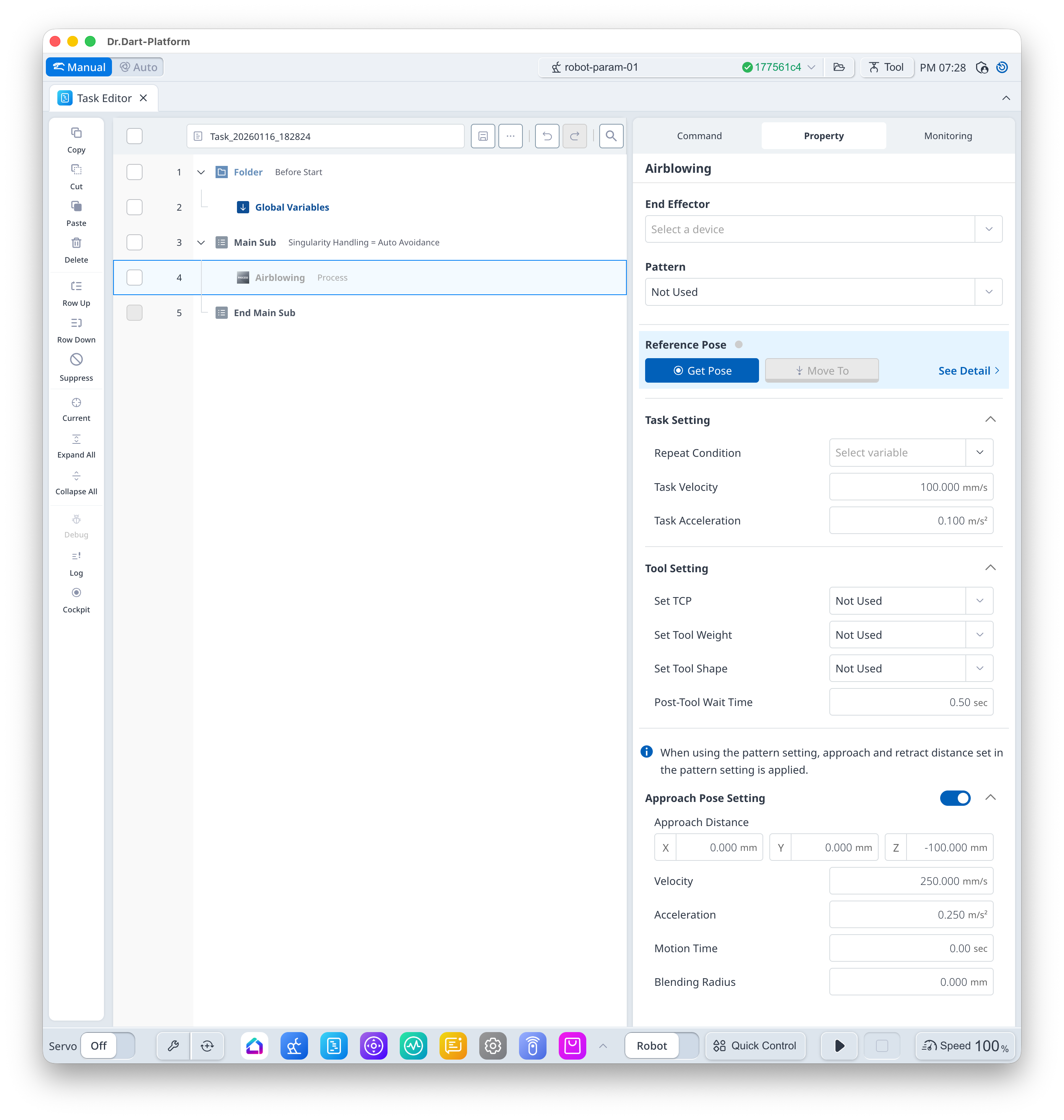
Basic Information
|
Item |
Description |
|---|---|
|
Recommended Device |
Tool |
|
Optinal Features |
|
|
Command Completion Condition |
|
|
Support Robot Series |
E, A, AS, M, H |
Default Motion Sequence
-
Default Mode
Move to [Approach Pose] → Move to [Reference Pose] → [Run] action of [End Effector] (→ Task/Joint Motion → [End Task])
-
[Pattern] Set
Move to [Approach Pose] → [Run] action of [End Effector] → Move to Pattern Calculation Pose (→ [End Task])
Definition of Screen
|
Item |
Description |
Default Value and Input Range |
|
|---|---|---|---|
|
Basic Setting |
End Effector |
I/O test available upon gripper selection |
|
|
Pattern |
Select if a pattern is used |
|
|
|
Reference Pose |
Teaching Pose
|
|
|
|
Task Setting |
Repeat Condition |
Select Repeat Index
|
|
|
Task Velocity |
This is the velocity from the approach pose to teaching pose.
|
100 mm/s [0.001 ~ 8000] |
|
|
Task Acceleration |
This is the acceleration from the approach pose to teaching pose.
|
0.1 m/s2 [0.001 ~ 20] |
|
|
Tool Setting |
Set TCP (Option) |
Select TCP |
Not Used [TCP items set in robot parameter] |
|
Set Tool Weight (Option) |
Select Tool Weight
|
Not Used [Tool Weight items set in robot parameter] |
|
|
Set Tool Shape (Option) |
Select Tool Shape |
Not Used [Tool Shape items set in robot parameter] |
|
|
Post-Tool Wait Time |
This is the standby time after [Run] action of [End Effector]. |
0.5 s [0 ~ 10000] |
|
|
Approach Pose Setting (Option) |
Use |
Select whether to use Approach Pose |
True [True, False] |
|
Approach Distance |
Distance from the teaching pose in x, y and z directions
|
[0, 0, -100] mm [-99999.999 ~ 99999.999] |
|
|
Velocity |
This is the motion velocity to the approach pose. |
250 mm/s [0.001 ~ 8000] |
|
|
Acceleration |
This is the motion acceleration to the approach pose. |
0.25 m/s2 [0.001 ~ 20] |
|
|
Motion Time |
This is the motion time to the approach pose.
|
0 s [0 ~ 10000] |
|
|
Blending Radius |
This is the blending radius connecting the movement between the approach pose and the teaching pose. |
0 mm [0 ~ 1000] |
|
Note
Freely teach the routine using motion commands that can be used between [Airblowing] and [End Task]. The available motion commands are as follows:
-
movel, movec, movesx, moveb, movej, movejx, movesj