
This is a command that manually opens/closes the door with a direct robot motion.
-
Teach the start pose and end pose to perform a door open/close motion.
-
The default setting is [Open] and if [Close] is selected, the teaching poses of the [Start Pose] and [End Pose] change.
-
However, the teaching pose change is not reflected in the UI.
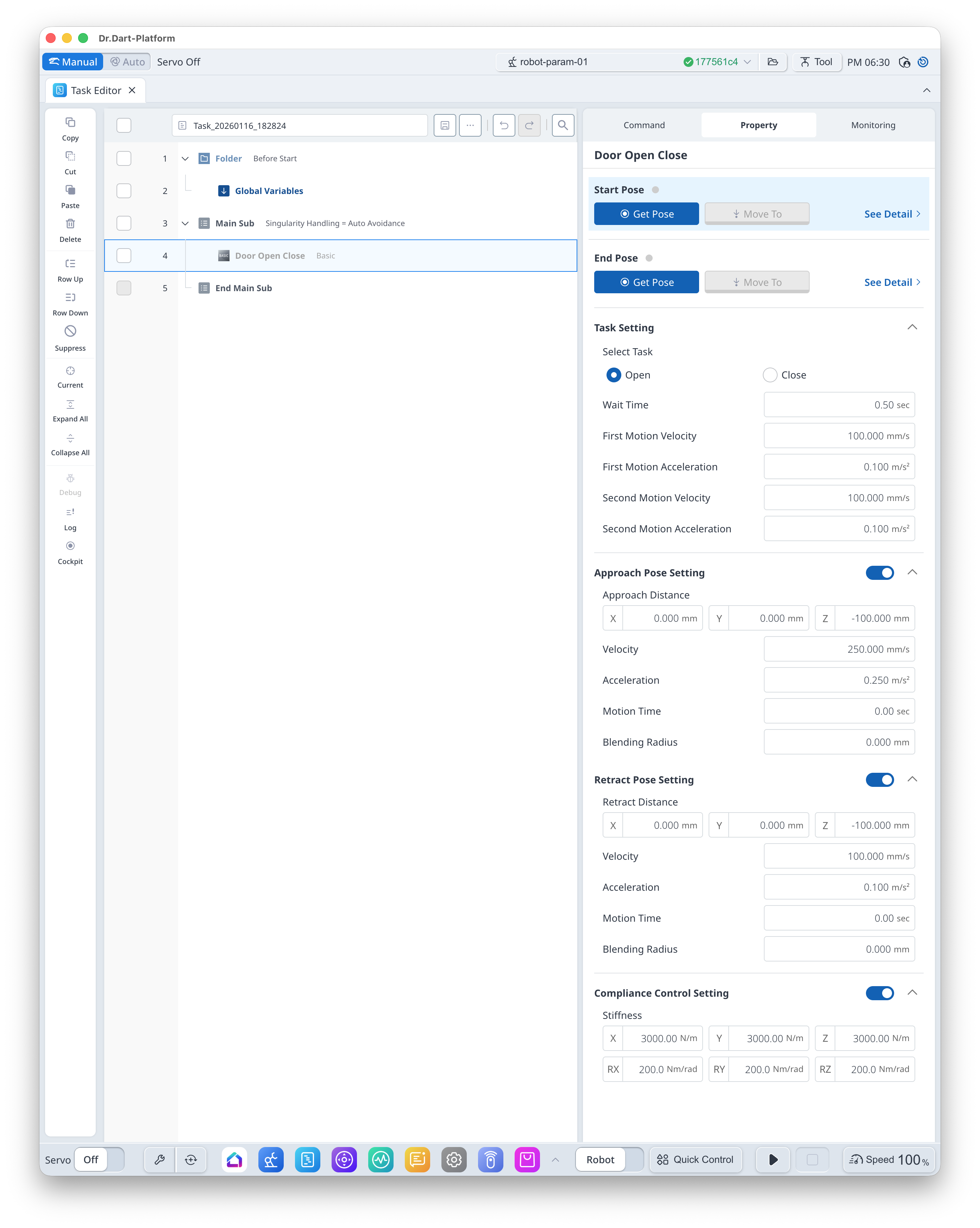
Basic Information
|
Item |
Description |
|---|---|
|
Recommended Device |
None |
|
Optinal Features |
|
|
Command Completion Condition |
Setting [Start Pose] and [End Pose] |
|
Support Robot Series |
E, A, AS, M, H |
Default Motion Sequence
Move to [Approach Pose] → Move to [Start Pose] → Move to [End Pose] → Move to [Retract Pose]
Definition of Screen
|
Item |
Description |
Default Value and Input Range |
|
|---|---|---|---|
|
Basic Setting |
Start Pose |
Teaching Pose
|
|
|
End Pose |
Teaching Pose
|
|
|
|
Task Setting |
Select Task (Option) |
Select Orientation
|
Open [Open, Close] |
|
Wait Time |
This is the standby time before moving to the start pose and after moving to the end pose. |
0.5 s [0 ~ 10000] |
|
|
First Velocity |
This is the velocity from the approach pose to the first teaching pose. |
100 mm/s [0.001 ~ 8000] |
|
|
First Acceleration |
This is the acceleration from the approach pose to the first teaching pose. |
0.1 m/s2 [0.001 ~ 20] |
|
|
Second Velocity |
This is the velocity from the approach pose to the second teaching pose. |
100 mm/s [0.001 ~ 8000] |
|
|
Second Acceleration |
This is the acceleration from the approach pose to the second teaching pose. |
0.1 m/s2 [0.001 ~ 20] |
|
|
Approach Pose Setting (Option) |
Use |
Select whether to use Approach Pose |
True [True, False] |
|
Approach Distance |
Distance from the teaching pose in x, y and z directions |
[0, 0, -100] mm [-99999.999 ~ 99999.999] |
|
|
Velocity |
This is the motion velocity to the approach pose. |
250 mm/s [0.001 ~ 8000] |
|
|
Acceleration |
This is the motion acceleration to the approach pose. |
0.25 m/s2 [0.001 ~ 20] |
|
|
Motion Time |
This is the motion time to the approach pose.
|
0 s [0 ~ 10000] |
|
|
Blending Radius |
This is the blending radius connecting the movement between the approach pose and the teaching pose.
|
0 mm [0 ~ 1000] |
|
|
Retract Pose Setting (Option) |
Use |
Select whether to use Retract Pose |
True [True, False] |
|
Retract Distance |
Distance from the teaching pose in x, y and z directions |
[0, 0, -100] mm [Individually -1000 ~ 1000] |
|
|
Velocity |
This is the motion velocity to the retract pose. |
100 mm/s [0.001 ~ 8000] |
|
|
Acceleration |
This is the motion acceleration to the retract pose. |
0.1 m/s2 [0.001 ~ 20] |
|
|
Motion Time |
This is the motion time to the retract pose.
|
0 s [0 ~ 10000] |
|
|
Blending Radius |
This is the blending radius connecting the movement between the teaching pose and the retract pose. |
0 mm [0 ~ 1000] |
|
|
Compliance Control Setting (Option) |
Use |
Select whether to use the Compliance Control |
False [True, False] |
|
Stiffness |
Stiffness Setting |
x=y=z
rx=ry=rz
|
|