
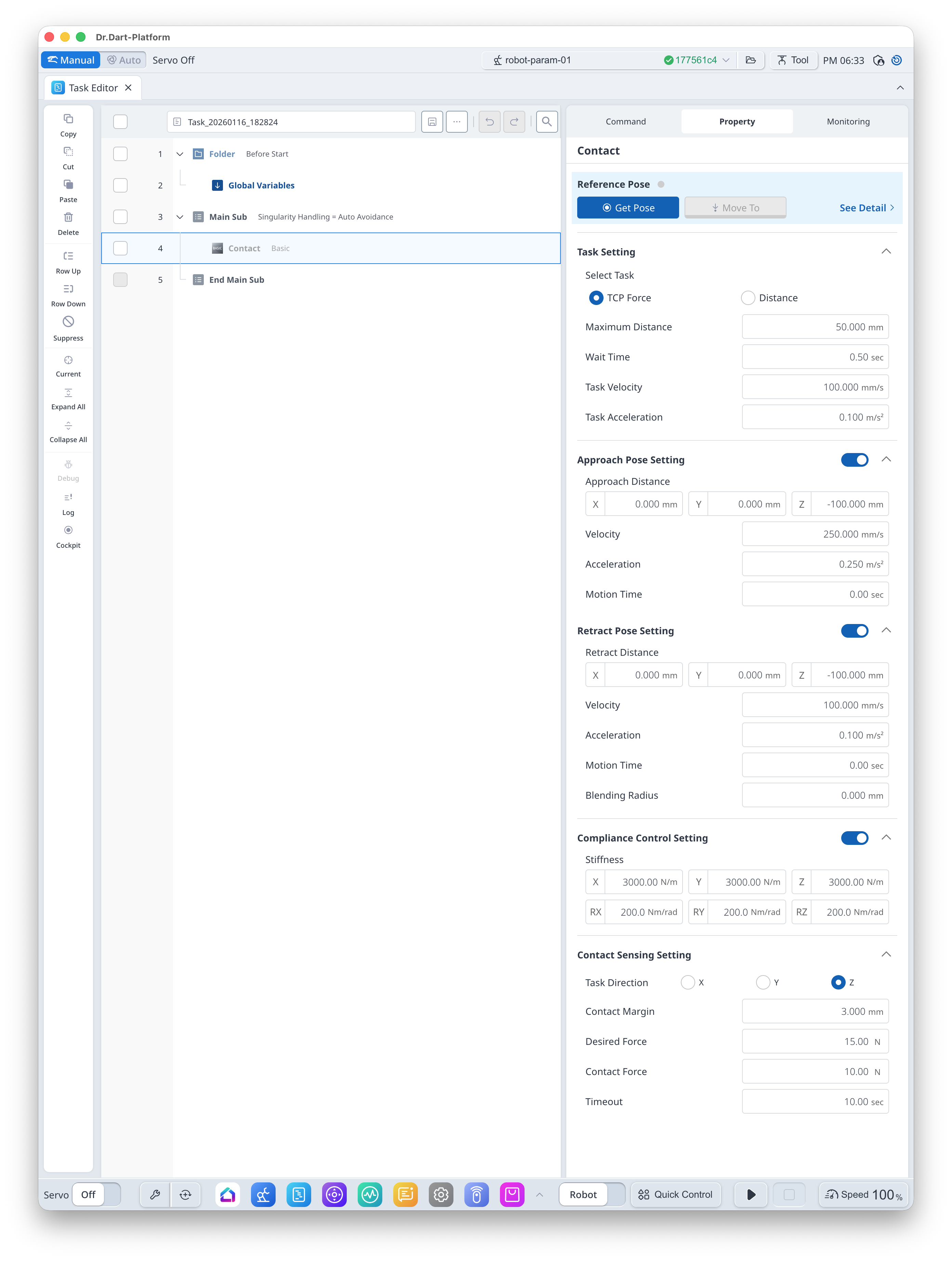
This is a command for moving a target distance after reaching the teaching pose or stopping movement if an external force is sensed during Force Control movement.
-
It requires force control in a specific direction, so it requires the [Compliance Control Setting] by default
Basic Information
|
Item |
Description |
|---|---|
|
Recommended Device |
None |
|
Optinal Features |
|
|
Command Completion Condition |
Setting [Reference Pose] |
|
Support Robot Series |
AS, M, H, P |
Default Motion Sequence
-
[TCP Force] Setting
Move to [Approach Pose] → Move to [Reference Pose] (position excluding [Contact Margin]) → Move with Force Control until External Force occur → Move to [Retract Pose] -
[Distance] Setting
Move to [Approach Pose] → Move to [Reference Pose] → Move [Maximum Distance] value with Force Control while checking External Force → Move to [Retract Pose]
Definition of Screen
|
Item |
Description |
Default Value and Input Range |
|
|---|---|---|---|
|
Basic Setting |
Reference Pose |
Teaching Pose
|
|
|
Task Setting |
Select Task (Option) |
Select [TCP Force] or [Distance] |
TCP Force [TCP Force, Distance] |
|
Maximum Distance |
Max Distance
|
50 mm [0 ~ 5000] |
|
|
Wait Time |
Standby time before/after move to teaching pose |
0.5 s [0 ~ 10000] |
|
|
Task Velocity |
This is the velocity from the approach pose to teaching pose. |
100 mm/s [0.001 ~ 8000] |
|
|
Task Acceleration |
This is the acceleration from the approach pose to teaching pose. |
0.1 m/s2 [0.001 ~ 20] |
|
|
Approach Pose Setting (Option) |
Use |
Select whether to use Approach Pose |
True [True, False] |
|
Approach Distance |
Distance from the teaching pose in x, y and z directions |
[0, 0, -100] mm [-99999.999 ~ 99999.999] |
|
|
Velocity |
This is the motion velocity to the approach pose. |
250 mm/s [0.001 ~ 8000] |
|
|
Acceleration |
This is the motion acceleration to the approach pose. |
0.25 m/s2 [0.001 ~ 20] |
|
|
Motion Time |
This is the motion time to the approach pose.
|
0 s [0 ~ 10000] |
|
|
Retract Pose Setting (Option) |
Use |
Select whether to use Retract Pose |
True [True, False] |
|
Retract Distance |
Distance from the teaching pose in x, y and z directions |
[0, 0, -100] mm [-99999.999 ~ 99999.999] |
|
|
Velocity |
This is the motion velocity to the retract pose. |
100 mm/s [0.001 ~ 8000] |
|
|
Acceleration |
This is the motion acceleration to the retract pose. |
0.1 m/s2 [0.001 ~ 20] |
|
|
Motion Time |
This is the motion time to the retract pose.
|
0 s [0 ~ 10000] |
|
|
Blending Radius |
This is the blending radius connecting the movement between the teaching pose and the retract pose. |
0 mm [0 ~ 1000] |
|
|
Compliance Control Setting (Option) |
Use |
Select whether to use the Compliance Control |
True [True, False] |
|
Stiffness |
Stiffness Setting |
x=y=z
rx=ry=rz
|
|
|
Contact Sensing Setting |
Task Direction |
Orientation setting during force control
|
Z [X, Y, Z] |
|
Contact Margin |
Margin for contact sensing section setting
|
3 mm [0 ~ 100] |
|
|
Desired Force |
Target Force Value
|
15 N [-1200 ~ 1200] |
|
|
Contact Force |
This is the reference force for contact sensing.
|
10 N [0 ~ 1200] |
|
|
Timeout |
This is the contact sensing time. |
10 s [0 ~ 10000] |
|