
P3020 Stop Category 0
Joint 1
Extension=100%, Speed=100%, Payload=100%
|
|
Stopping distance (rad) |
Stopping time (ms) |
|---|---|---|
|
Axis 1 |
0.451 |
435 |
Joint 2
Extension=100%, Speed=100%, Payload=100%
|
|
Stopping distance (rad) |
Stopping time (ms) |
|---|---|---|
|
Axis 2 |
0.385 |
624 |
|
Axis 3 |
0.00430 |
Joint 3
Extension=100%, Speed=100%, Payload=100%
|
|
Stopping distance (rad) |
Stopping time (ms) |
|---|---|---|
|
Axis 2 |
0.0192 |
132 |
|
Axis 3 |
0.0993 |
P3020 Stop Category 1
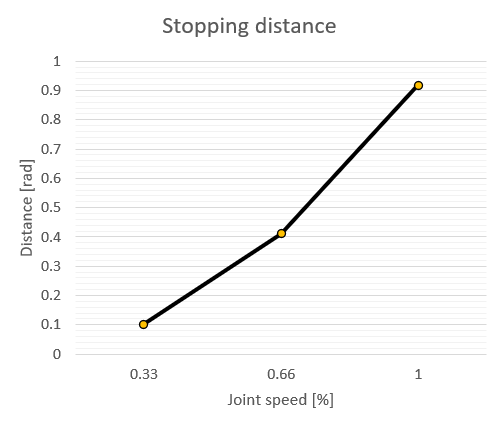
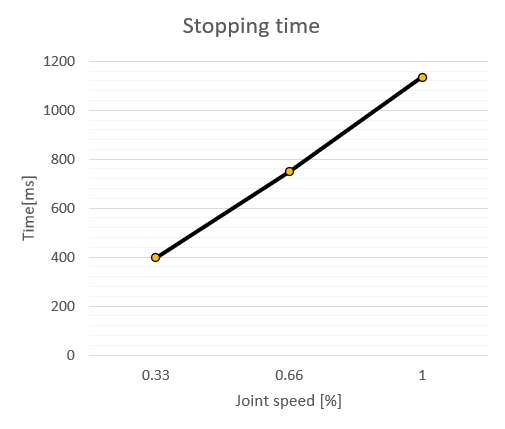
Stop Distance and Stop Time of Joint 1 (Base)
|
Stop Distance at Max. Load (rad) |
Stop Time at Max. Load (ms) |
|
|
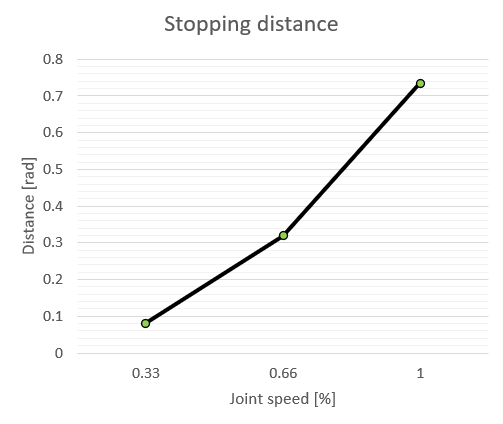
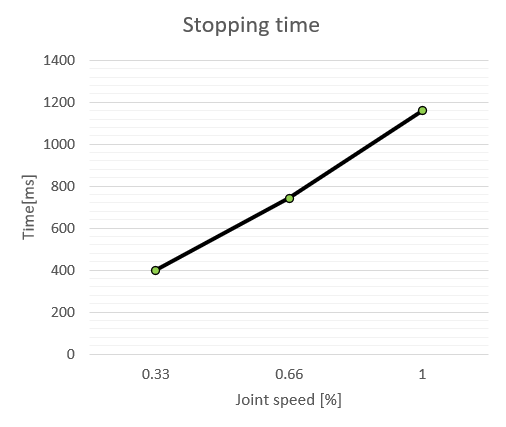
Stop Distance and Stop Time of Joint 2 (Shoulder)
|
Stop Distance at Max. Load (rad) |
Stop Time at Max. Load (ms) |
|
|
Stop Distance and Stop Time of Joint 3 (Elbow)
|
Stop Distance at Max. Stretch Level (rad) |
Stop Time at Max. Stretch Level (ms) |
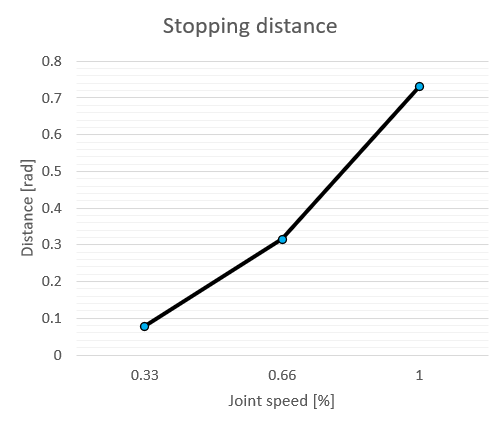
|
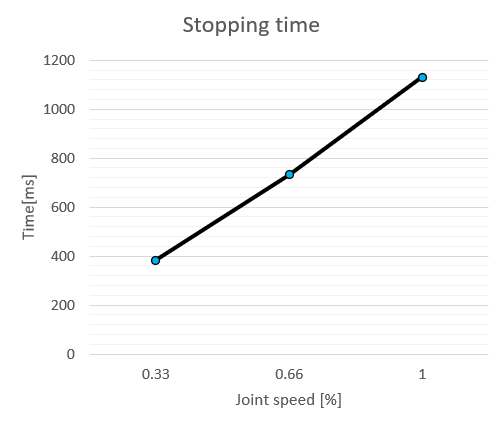
|
For P3020, Stop Distance and Stop Time are not affected by payload and extension.
Caution - Stopping distance near the J5 tilt angle limit range
-
When the tilt (J5) angle limit is applied by the tool weight setting, the robot detects that J5 has entered the limited range and then decelerates to a stop with Stop Category 1. Because J5 keeps moving while decelerating, it may stop past the limited range.
-
The faster J5 moves, the longer the travel distance during stopping. The stopping distance and stopping time tables and graphs above are for joints 1 to 3 and do not apply to J5.
-
During system integration, check the safety distance considering the J5 movement near the limited range, and configure the work path so that it does not pass through the limited range (for the tilt angle limit, refer to Robot Specifications > Allowed Moment and Inertia).