
Manipulator
Names of Parts
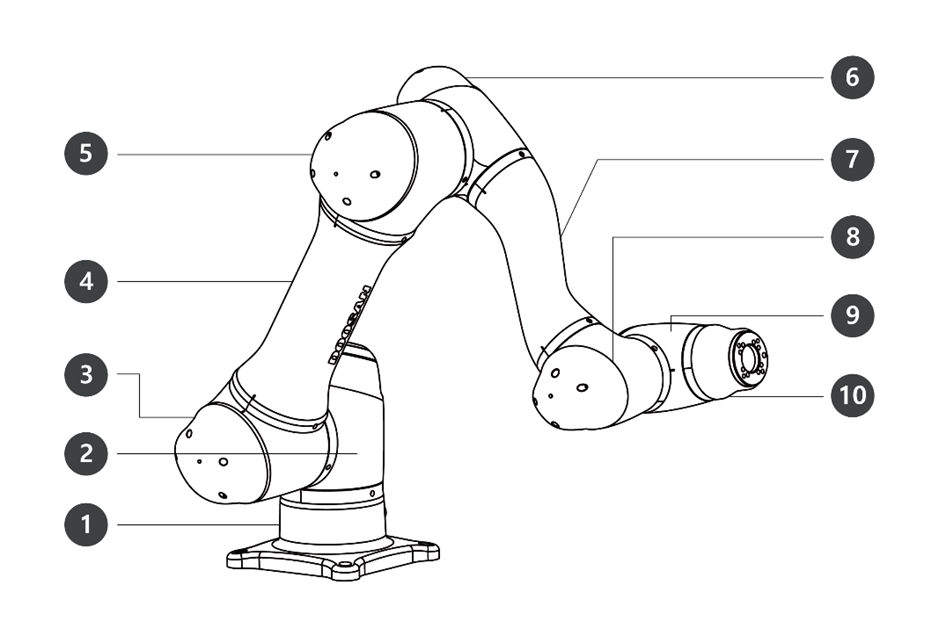
|
No. |
Name |
No. |
Name |
|---|---|---|---|
|
1 |
Base |
6 |
J4 |
|
2 |
J1 |
7 |
Link2 |
|
3 |
J2 |
8 |
J5 |
|
4 |
Link1 |
9 |
J6 |
|
5 |
J3 |
10 |
Tool Flange |
Key Features
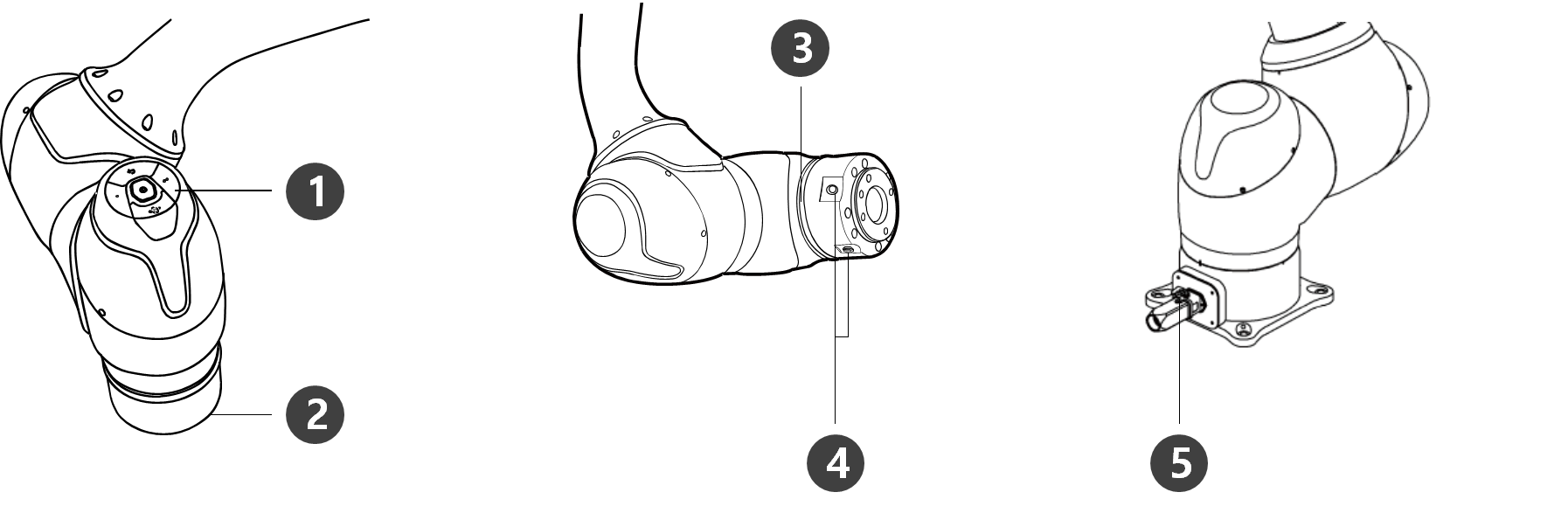
|
No. |
Item |
Description |
|---|---|---|
|
1 |
Cockpit |
[Optional] Operation buttons for direct teaching and operation |
|
2 |
Tool Flange |
Area to install tools. |
|
3 |
Flange LED |
Displays the robot status with different colors. For more information about robot status, refer to the /wiki/spaces/TESMT/pages/51937696. The H Series is supplied with an additional LED on the 1-axis indicating the same state and color.
|
|
4 |
Flange I/O |
I/O port for tool control.
|
|
5 |
Connector |
Used for supplying power to and communication of the robot. |
Controller
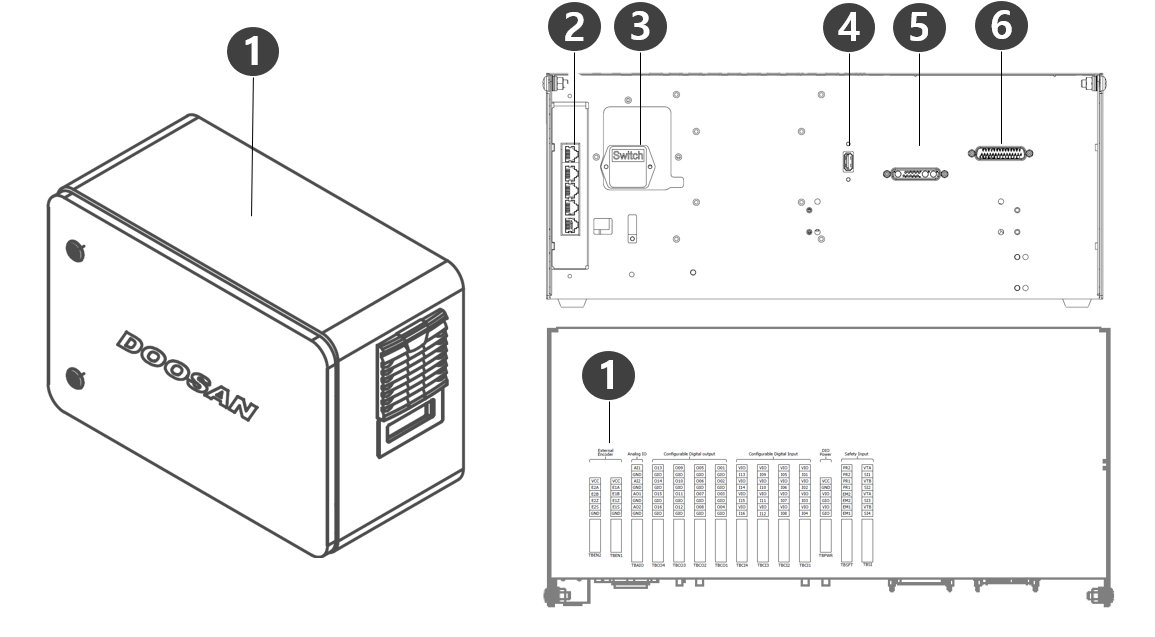
|
No. |
Item |
Description |
|---|---|---|
|
1 |
I/O connection terminal (internal) |
It can be connected with other robots' controllers or peripherals. |
|
2 |
Network connection terminal |
Used for connecting to the network connection terminal inside the controller to use Laptops, TCP/IP devices, and Modbus equipment. |
|
3 |
Power connection terminal/switch |
Used for connecting the mains power of the controller to turn it on or off. For more information, refer to Power on/off the system. |
|
4 |
USB connection terminal |
Used to store logs created while the robot is operating in the USB storage, or export and import tasks. |
|
5 |
Manipulator cable connection terminal |
Used for connecting the manipulator cable to the controller. |
|
6 |
Teach pendant cable connection terminal |
Used for connecting the teach pendant cable to the controller. |
-
If you choose an optional controller, check the user manual in the appendix to connect before use.
Teach pendant
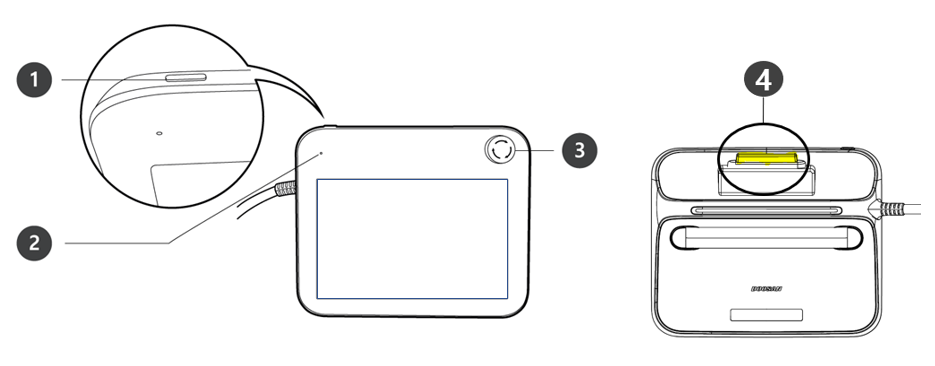
|
No. |
Item |
Description |
|---|---|---|
|
1 |
Power Button |
|
|
2 |
Power LED |
|
|
3 |
Emergency stop button |
|
|
4 |
Hand-Guiding button (3PE 3 Position Enable) Switch) |
|
-
If the teach pendant needs to be protected and mounted during operation, the soft cover supplied by us makes it safer and easier to use.
-
New TP (TP-02) added function: Hand Guide dual function
-
The existing TP (TP-01) cannot be used in the integrated controller. (Pin Map changed due to 3PE Switch)
-
The new TP (TP-02) can be used in the existing controller, but the LED is changed to a single color (red) and displayed, and additional functions cannot be used.
-