Scroll Conditional Content은(는) Cloud 편집기에서만 지원됩니다
Forge 매크로는 레거시 편집기에서 지원되지 않으므로, 이 매크로를 제대로 표시하려면 이 콘텐츠를 Cloud 편집기로 변환해야 합니다. Cloud 편집기로 변환하는 방법에 대해 자세히 알아보기
Scroll Conditional Content은(는) Cloud 편집기에서만 지원됩니다
Forge 매크로는 레거시 편집기에서 지원되지 않으므로, 이 매크로를 제대로 표시하려면 이 콘텐츠를 Cloud 편집기로 변환해야 합니다. Cloud 편집기로 변환하는 방법에 대해 자세히 알아보기
Scroll Conditional Content은(는) Cloud 편집기에서만 지원됩니다
Forge 매크로는 레거시 편집기에서 지원되지 않으므로, 이 매크로를 제대로 표시하려면 이 콘텐츠를 Cloud 편집기로 변환해야 합니다. Cloud 편집기로 변환하는 방법에 대해 자세히 알아보기
Scroll Conditional Content은(는) Cloud 편집기에서만 지원됩니다
Forge 매크로는 레거시 편집기에서 지원되지 않으므로, 이 매크로를 제대로 표시하려면 이 콘텐츠를 Cloud 편집기로 변환해야 합니다. Cloud 편집기로 변환하는 방법에 대해 자세히 알아보기
Scroll Conditional Content은(는) Cloud 편집기에서만 지원됩니다
Forge 매크로는 레거시 편집기에서 지원되지 않으므로, 이 매크로를 제대로 표시하려면 이 콘텐츠를 Cloud 편집기로 변환해야 합니다. Cloud 편집기로 변환하는 방법에 대해 자세히 알아보기
-
Make sure to check that the pins in the cable end are not damaged or bent before connecting the cable.
-
When using the Teach Pendant hanging on the wall or controller, be careful not to trip over the connecting cables.
-
Be careful not to allow the controller, Teach Pendant or cable to come in contact with water.
-
Avoid installing the controller or Teach Pendant in a dusty or wet environment.
-
The control box and Teach Pendant must not be exposed to a dusty environment that exceeds the IP20 rating. Be especially careful in environments with conductive dust.
-
When configuring the system, it is recommended to install a noise reducer to prevent noise influence among devices and system malfunctions.
-
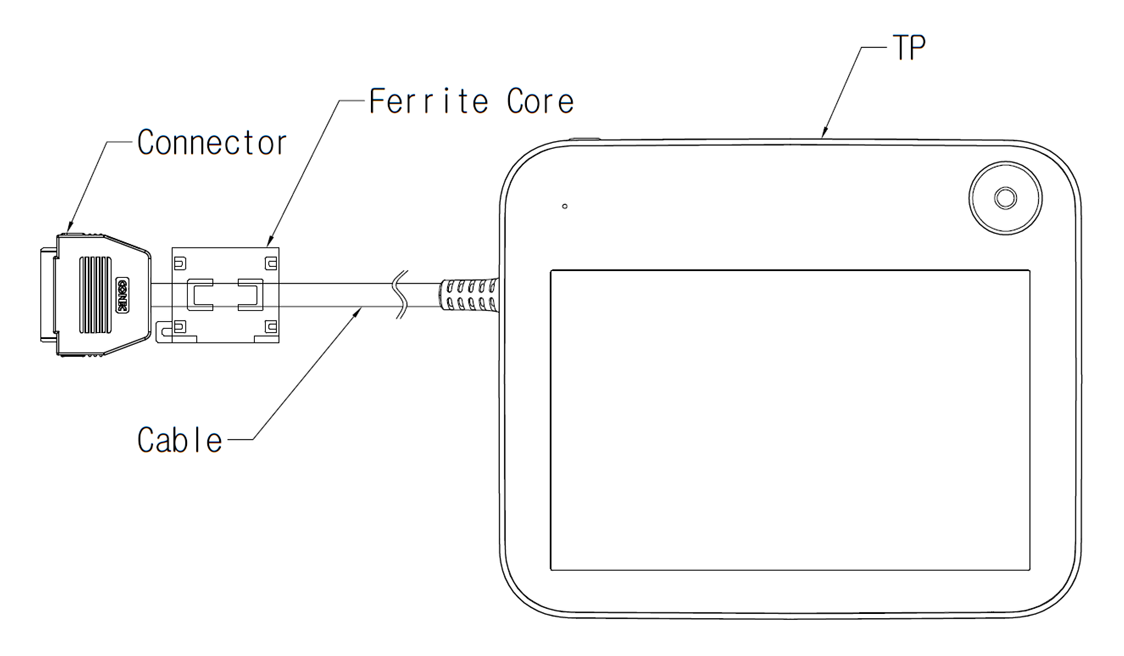
If it is affected by noise generated by electromagnetic waves, it is recommended that ferrite cores be installed on the connection parts of the Teach Pendant cable to ensure normal operation. The installation locations are as follows: