
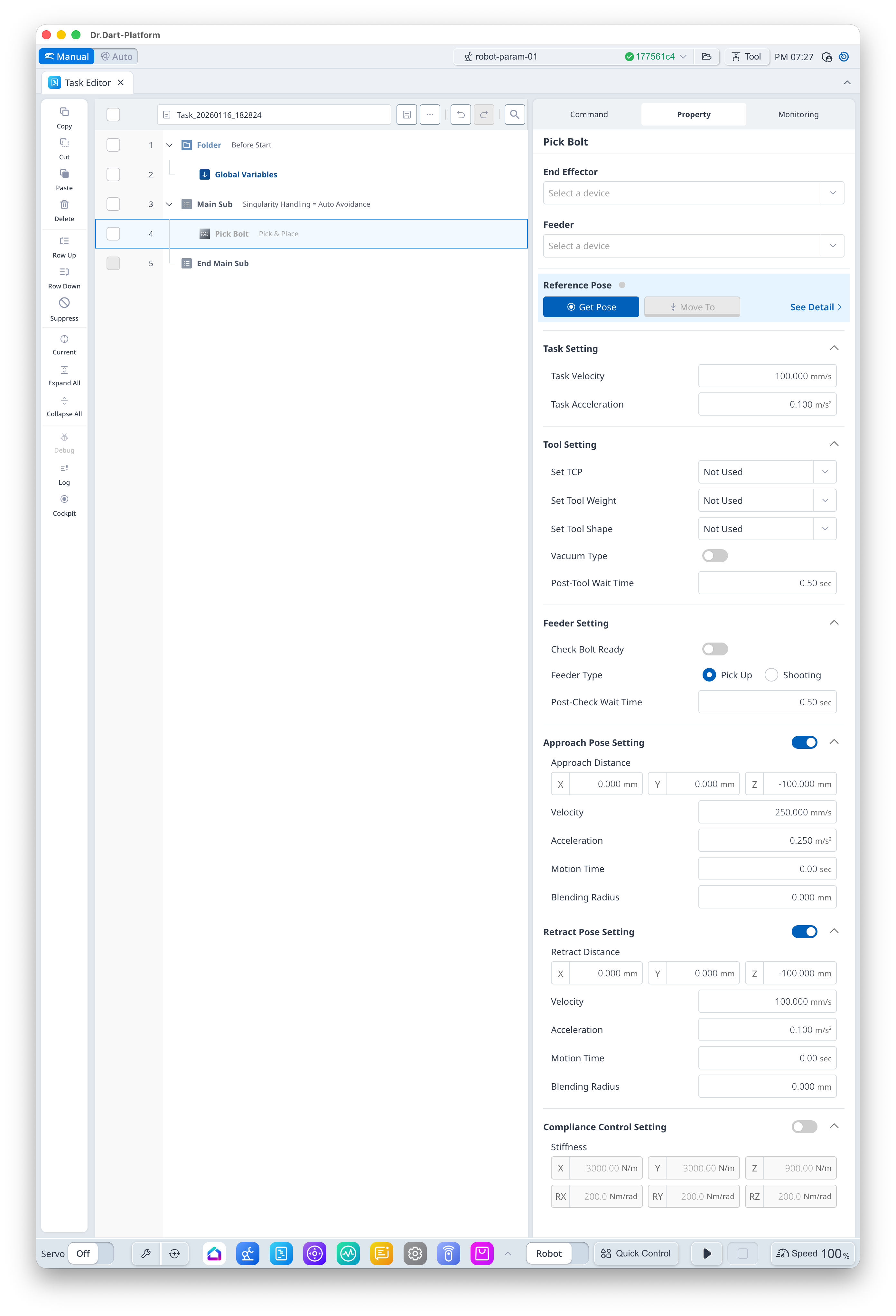
This is a command for picking up a bolt placed in a specific position by the bolt feeder using a screwdriver. If the screwdriver supports a vacuum, it can ensure stable bolt pick up.
Basic Information
|
Item |
Description |
|---|---|
|
Recommended Device |
|
|
Optinal Features |
|
|
Command Completion Condition |
|
|
Support Robot Series |
E, A, AS, M, H |
Default Motion Sequence
Move to [Approach Pose] → Move to [Reference Pose] → ScrewDriver Motion (in the case of a [Vacuum Type], [Vacuum_On]) (in the case of ScrewDriver, no separate motion) → Move to [Retract Pose]
Definition of Screen
|
Item |
Description |
Default Value and Input Range |
|
|---|---|---|---|
|
Basic Setting |
End Effector |
I/O test available upon gripper selection |
|
|
Feeder |
I/O test available upon bolt feeder selection |
|
|
|
Reference Pose |
Teaching Pose
|
|
|
|
Task Setting |
Task Velocity |
This is the velocity from the approach pose to teaching pose. |
100 mm/s [0.001 ~ 8000] |
|
Task Acceleration |
This is the acceleration from the approach pose to teaching pose. |
0.1 m/s2 [0.001 ~ 20] |
|
|
Gripper Setting |
Set TCP (Option) |
Select TCP |
Not Used [TCP items set in robot parameter] |
|
Set Tool Weight (Option) |
Select Tool Weight
|
Not Used [Tool Weight items set in robot parameter] |
|
|
Set Tool Shape (Option) |
Select Tool Shape |
Not Used [Tool Shape items set in robot parameter] |
|
|
Vacuum Type (Option) |
Select Vacuum Support Status |
False [True, False] |
|
|
Post-Tool Wait Time |
Standby time after [Run] action of [End Effector]. |
0.5 s [0 ~ 10000] |
|
|
Feeder Setting |
Check Bolt Ready (Option) |
Select Bolt Ready signal standby |
False [True, False] |
|
Feeder Type (Option) |
Select Feeder type |
Pick Up [Pick Up, Shooting] |
|
|
Post-Check Wait Time |
Standby time after bolt ready signal completion |
0.5 s [0 ~ 10000] |
|
|
Approach Pose Setting (Option) |
Use |
Select whether to use Approach Pose |
True [True, False] |
|
Approach Distance |
Distance from the teaching pose in x, y and z directions |
[0, 0, -100] mm [-99999.999 ~ 99999.999] |
|
|
Velocity |
This is the motion velocity to the approach pose. |
250 mm/s [0.001 ~ 8000] |
|
|
Acceleration |
This is the motion acceleration to the approach pose. |
0.25 m/s2 [0.001 ~ 20] |
|
|
Motion Time |
This is the motion time to the approach pose.
|
0 s [0 ~ 10000] |
|
|
Blending Radius |
This is the blending radius connecting the movement between the approach pose and the teaching pose.
|
0 mm [0 ~ 1000] |
|
|
Retract Pose Setting (Option) |
Use |
Select whether to use Retract Pose |
True [True, False] |
|
Retract Distance |
Distance from the teaching pose in x, y and z directions |
[0, 0, -100] mm [-99999.999 ~ 99999.999] |
|
|
Velocity |
This is the motion velocity to the retract pose. |
100 mm/s [0.001 ~ 8000] |
|
|
Acceleration |
This is the motion acceleration to the retract pose. |
0.1 m/s2 [0.001 ~ 20] |
|
|
Motion Time |
This is the motion time to the retract pose.
|
0 s [0 ~ 10000] |
|
|
Blending Radius |
This is the blending radius connecting the movement between the teaching pose and the retract pose. |
0 mm [0 ~ 1000] |
|
|
Compliance Control Setting (Option) |
Use |
Select whether to use the Compliance Control |
False [True, False] |
|
Stiffness |
Stiffness Setting |
x=y=z
rx=ry=rz
|
|