
更改和禁用密码
要进入带有锁定图标( )的设置,需要输入密码。
要更改或禁用带有锁定图标的设置的密码,请按照以下步骤操作:
在 Settings(设置)菜单中,选择 Password > Safety Password(密码 > 安全密码)。
输入当前的程序密码,然后点击 Confirm(确认)按钮。
初始系统密码为 admin。
要禁用密码,点击 Password Lock(密码锁)按钮并禁用。
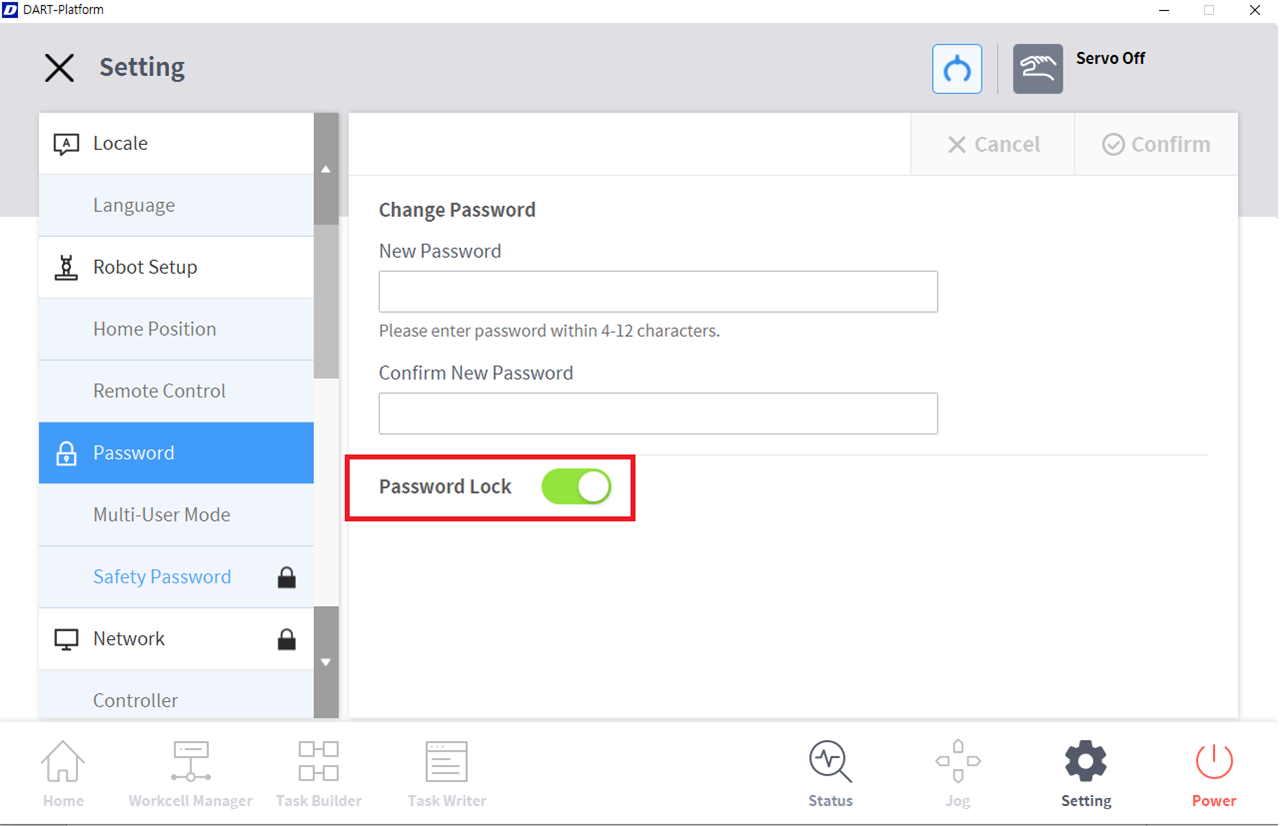
点击 Confirm(确认)按钮。

注
即使禁用了密码锁定,重启系统也会启用密码锁定。
要进入带有锁定图标()的设置,需要输入密码。
要更改或禁用带有锁定图标的设置的密码,请按照以下步骤操作:
在 Settings(设置)菜单中,选择 Password > Safety Password(密码 > 安全密码)。
输入当前的程序密码,然后点击 Confirm(确认)按钮。
初始系统密码为 admin。
要禁用密码,点击 Password Lock(密码锁)按钮并禁用。
点击 Confirm(确认)按钮。
注
即使禁用了密码锁定,重启系统也会启用密码锁定。