
Operator Intervention Settings(Analog)
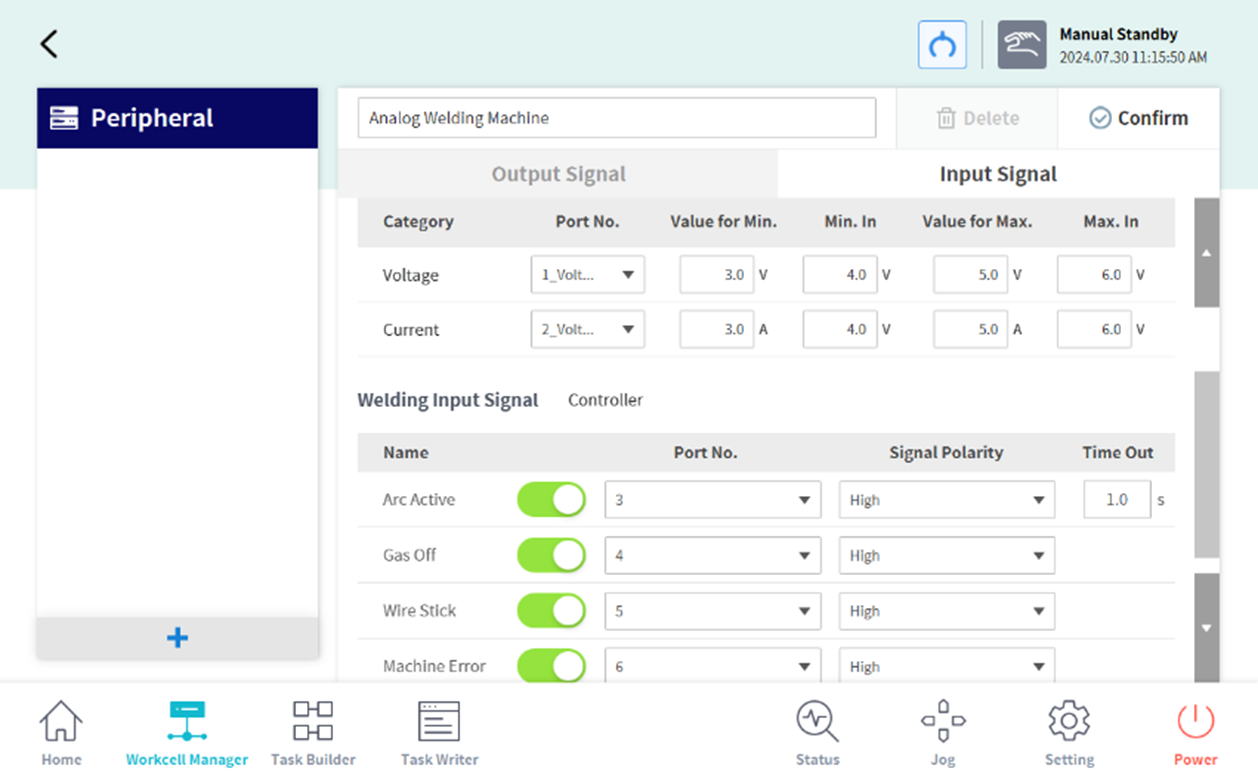
In the picture below, after selecting the function you want to use from Arc Start, Gas Off, Wire Stick, or Mechanical Error functions, you need to configure the digital input port and polarity.
In common situations where these signals are deactivated, if the Arc Start timeout is exceeded, a Operator Intervention function popup will appear, allowing the operator to handguide and use the Move along the path function to move the robot, solve the problem, and resume work.
(Operator Intervention function: User manual - Getting Started with Robot - Creating a Task Program - Refer to Operator Intervention Function)
Waning. The function of resuming welding within the Operator Intervention function is only available in analog welding.
번호 | 항목 | 설명 |
|---|---|---|
번호 | 항목 | 설명 |
1 | Arc Active | It monitors the arc start signal from the welder and triggers a Operator Intervention popup when the signal is deactivated. If a timeout is set, a Operator Intervention popup will be triggered if there is no signal on the arc start channel for the specified time. |
2 | Gas Off | It monitors the gas off signal from the welder and triggers a Operator Intervention popup when the signal is deactivated. |
3 | Wire Stick | It monitors the wire stick signal from the welder and triggers a Operator Intervention popup when the signal is deactivated. |
4 | Machine Error | It monitors the mechanical error signal from the welder and triggers a Operator Intervention popup when the signal is deactivated. |