
Monitoring Adjustment Items 1
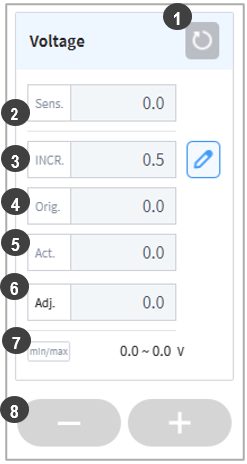
Six items, voltage, feeding speed (WFSpeed), current, movement speed, offset-Y and offset-Z, can be monitored in real-time during welding. The sensing value (Sens.), origin target (Orig. Target), adjustment amount (INCR.), and adjustment value (Adj.) can be monitored and adjusted. However, welding current can only be monitored. (Welding current changes through feeding speed adjustment.)
| No. | Item | Description |
|---|---|---|
1 | Reset Button | This resets the target adjustment value (Adj.) to the initial target value (Orig.). |
2 | Sensing Value (Sens.) | This monitors and displays the current value of each item. This displays the welding machine or sensor input value from the analog input channel selected in the welding machine settings.
|
3 | Increase Amount (INCR.) | Press the |
4 | Initial Target Value (Orig.) | This is the target value set during Welding Condition Setting. |
5 | Actual Target Value (Act.) | This is the actual welding value reaching the main welding section. If a welding motion section condition is adjusted, the target value of the corresponding condition is also reflected. |
6 | Adjustment Target (Adj.) | This is the current adjustment condition. It is set as the origin target when welding starts, and it can be increased or decreased by pressing the adjustment increment +/- buttons. |
7 | Min/Max | This displays the minimum and maximum adjustable values set under Welding Condition Settings. |
8 | +/- Buttons | Adjustment by the increase amount is applied. |
