
Slave Monitoring
Slave Monitoring Screen Layout
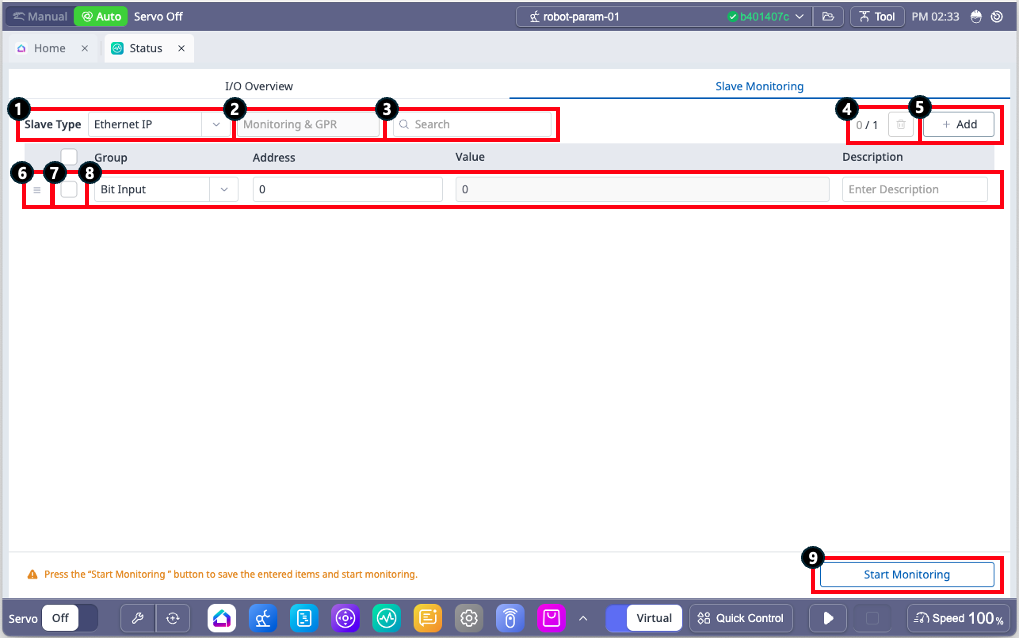
Items | Description | |
|---|---|---|
| 1 | Slave Type | Change the communication method for monitoring.
|
| 2 | Ethernet Adapter Type | Check the Adapter Type of the currently configured Ethernet IP.
|
| 3 | Search | Search register data being monitored.
|
| 4 | Remove monitoring data | Remove data with activated check boxes.
|
| 5 | Add monitoring data | Add monitoring data.
|
| 6 | Reorder | A button to change the order of data.
|
| 7 | Check Box | Select the data to be removed. |
| 8 | Data setting | Configure the group, address, description, and display method for the monitoring data. For Modbus
For Ethernet IP and Profinet
|
| 9 | Start/Stop Monitoring | This button allows starting or stopping the monitoring process.
|