
Logs module
With this module, logs can be managed by any criteria and dates.
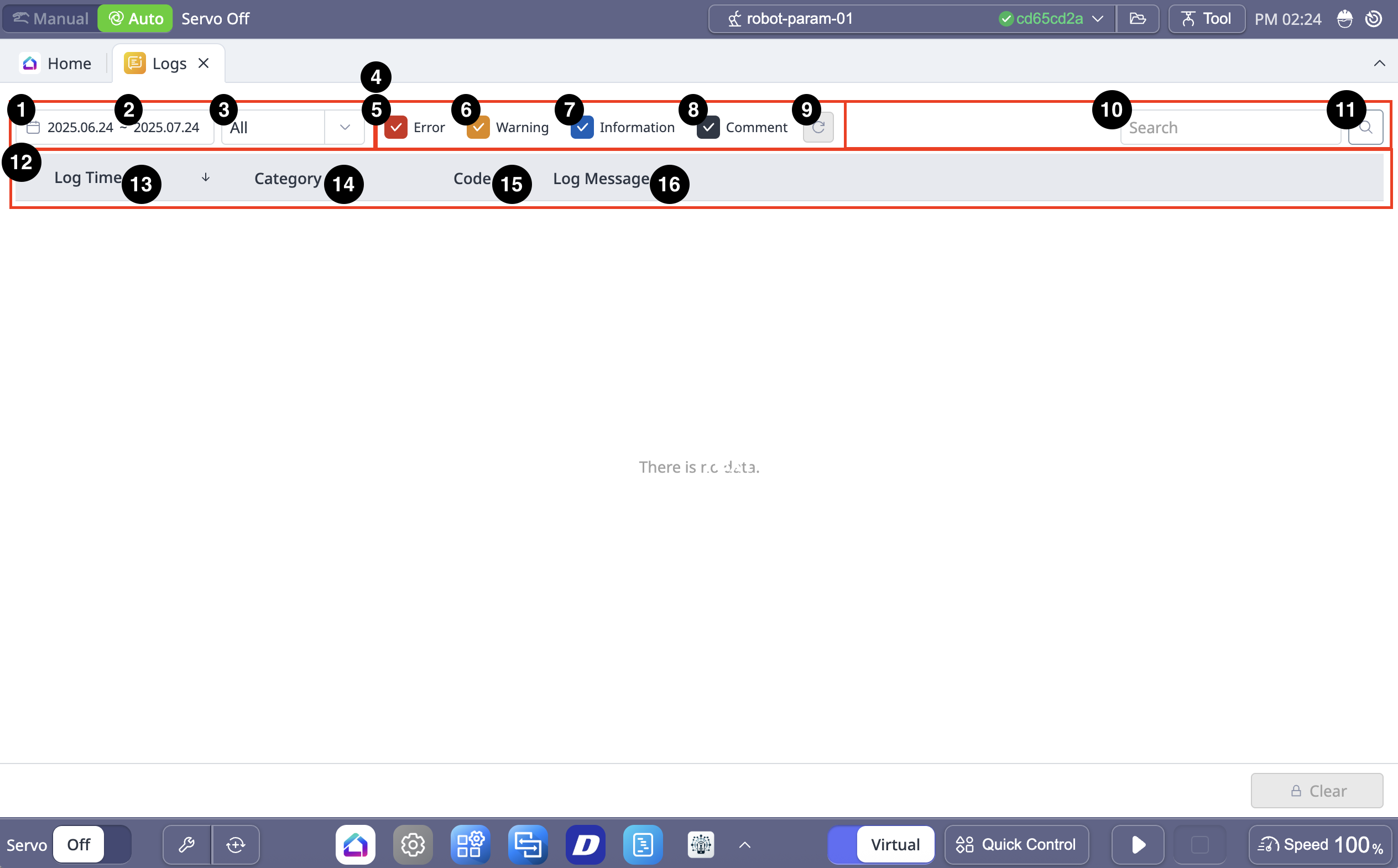
Menu
Items | Description | |
|---|---|---|
| 1 | Section for Search | Allows you to search by any criteria. |
| 2 | Date Filter | Allows you to view logs for a period of up to a month. |
| 3 | Category | Allows you to view logs by selecting a category. The categories are:
|
| 4 | Level | This is where you can select the type of log. |
| 5 | Error | If checked, error logs are seen. |
| 6 | Warning | If checked, warning logs are seen. |
| 7 | Information | If checked, information logs are seen. |
| 8 | Comment | If checked, comment logs are seen. |
| 9 | Filter Reset | This button allows you to initialize the selected log type. |
| 10 | Code or Keyword | This field is where you search for the desired code or keyword. |
| 11 | Search | This button allows you to search for what you need. |
| 12 | Log Table header | Header of the log table. |
| 13 | Log time | The time of each log is seen. |
| 14 | Category | The category of each log is seen. |
| 15 | Code | The code of each log is seen. |
| 16 | Log Message | Log messages are seen. |
| 17 | Clear | This button allows you to delete the log. |