
dsr_control + moveit
Feature
- Launch the robot model on Rviz simulator and operated by MoveIt.
- Working by connecting with emulator mode or real robot.
- The emulator mode only works in virtual mode.
Parameter
| Paramater Name | Paramater Name | Default Value | Description |
|---|---|---|---|
host | - | 127.0.0.1 | Robot Controller IP . Emulator : 127.0.0.1 . Real robot controller : 192.168.127.100 |
Port | - | 12345 | port |
mode | - | virtual | Robot operation mode - virtual : virtual mode - real : real mode |
model | - | m1013 | M-Series Robot model . m0609, m0617, m1013, m1509 A-Series Robot model . a0509 |
color | - | white | Robot color . white or blue |
gripper | - | none | using gripper or not . none : not use gripper . robotiq_2f : use robotiq 2finger gripper |
Example
BASH
<virtual mode>
$ roslaunch dsr_control dsr_moveit.launch model:=m0609 mode:=virtual
$ roslaunch dsr_control dsr_moveit.launch model:=m0617
$ roslaunch dsr_control dsr_moveit.launch model:=m1013 mode:=virtual color:=blue

<real mode>
Robot controller IP defalut = 192.168.127.100, port = 12345
$ roslaunch dsr_control dsr_moveit.launch model:=m1509 host:=192.168.127.100 mode:=real color:=blue gripper:=robotiq_2f
$ roslaunch dsr_control dsr_moveit.launch model:=a0509 host:=192.168.127.100 mode:=real
The Robot and Motion Planning Interface window are loaded on Rviz(Figure 4.2).
The MotionPlanning allows the robot to run in real environment.
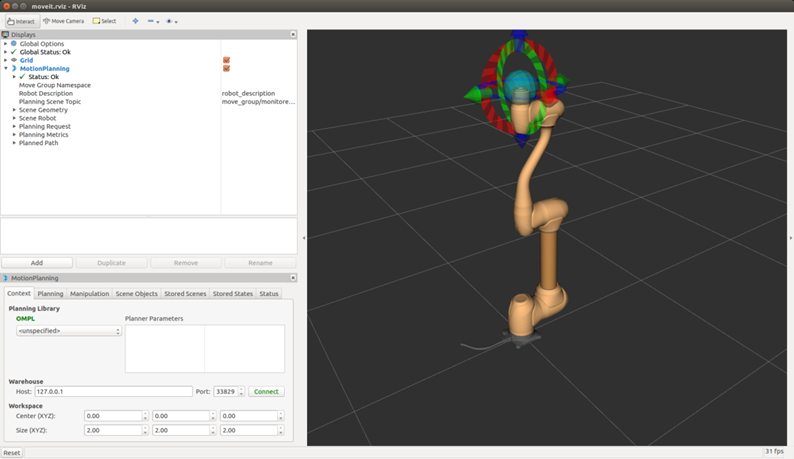
Figure 4.2 Rviz + dsr_control